
DualFix is a WordPress maintenance and recovery plugin by ARN Smart. It scans your site for clutter, classifies every finding, keeps cleanup locked until verification passes, takes a Safety Snapshot before anything is deleted and audits the result. Backups, restore, one-click rollback and scheduled maintenance sit behind the same guarded path, and everything runs on your own server.
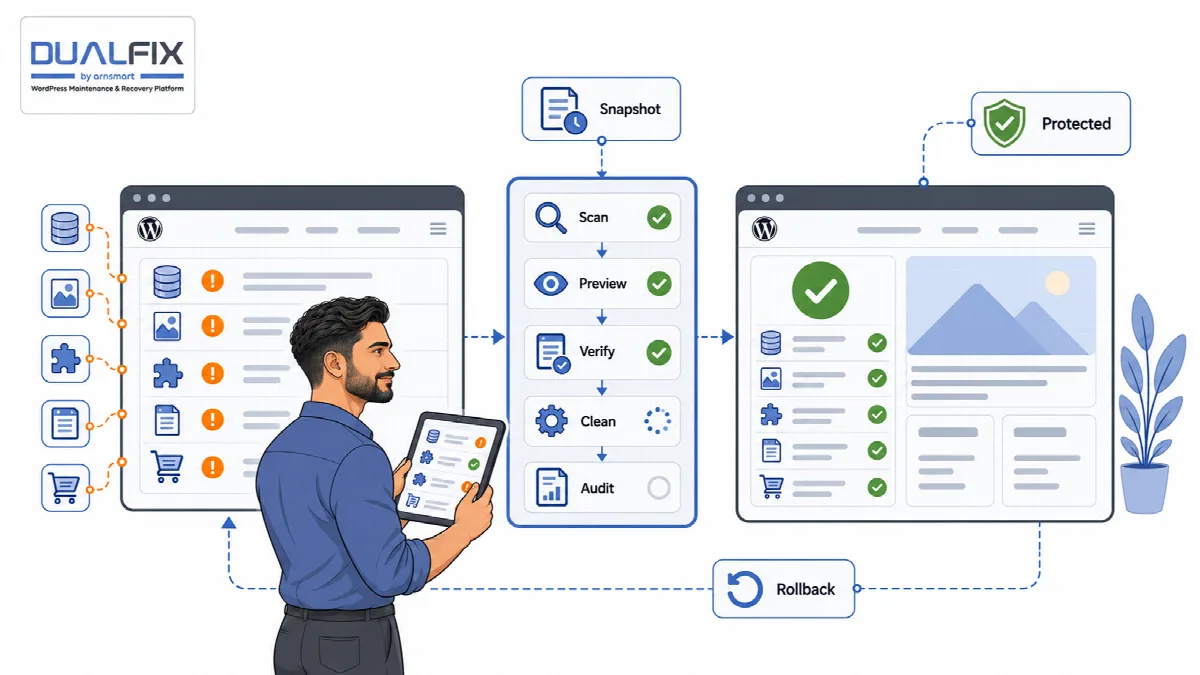
How DualFix works
- Scan. DualFix scans one area of the site at a time and stores the findings. A scan never deletes anything.
- Review and preview. Every finding is classified as safe, needs review, dangerous or protected, with the reason shown. A preview shows what a cleanup would do.
- Verify. Dependencies and protected data are checked. Cleanup stays locked until the verification gate opens.
- Clean. DualFix takes a Safety Snapshot, then removes only the items that passed, checking each one again at the moment of deletion.
- Audit. The result is confirmed and the site health score is updated. The cleanup can be rolled back from its snapshot.
Before the first preview, the Setup Wizard learns your hosting, plugins and, in DualFix Pro, your media library and store, so DualFix knows what must stay protected.
The two editions
DualFix Free is the plugin ARN Smart Cleanup and Recovery, made for the WordPress.org plugin directory, where it is in review. It covers the guarded database cleanup together with backups, restore and the rest of the recovery toolkit. It needs no account and no licence. Its menu in the WordPress admin is Cleanup and Recovery.
DualFix Pro is the plugin ARN Smart DualFix, available from arnsmart.com. It adds media, residue and WooCommerce cleanup, safety settings, Smart Policies, off-site backup copies and AI Diagnosis. It needs a licence, which you activate once per site or once per multisite network. Its menu is ARN DualFix.
The two editions are separate plugins with their own settings, records and backups. DualFix Free does not unlock into DualFix Pro.
| Capability | DualFix Free | DualFix Pro |
|---|---|---|
| Cleanup areas | WordPress database: expired transients and orphaned meta; revisions, autosaves, trash, cron hooks, widgets and autoloaded options for review | The same, but revisions are removed too; plus Media Hygiene, Residue Cleaner and WooCleaner |
| Guarded pipeline | Scan, Review + Preview, Verify, Cleanup and Audit, with a Safety Snapshot and rollback | The same; snapshots also keep the generated image files a media cleanup deletes |
| Protection of active plugin data | Plugin registry for WordPress core, page builders, WooCommerce, custom fields, SEO and multilingual plugins | The same |
| Safety settings | Batch size | Batch size, Safe mode, Confidence threshold, protection of original uploads and WooCommerce orders, Cleanup Launcher profiles |
| Backups | Full, database, uploads, plugins and themes; manual and scheduled; verify, download and guarded restore | The same |
| Backup copies | A mirror folder on the same server | A mirror folder, S3-compatible storage or an FTP / FTPS server |
| Automation | Auto Mode (off by default) and notifications | The same, plus scheduled scans and Smart Policies |
| Diagnosis | Setup Wizard, health score, logs, reports, diagnostics, hardening audit and configuration export | The same, plus AI Diagnosis with preview and masking |
| Multisite | Network Overview and network backup permissions | The same, plus one licence for the whole network |
| Account or licence | None | Licence with an ARNA activation code |
Note: Neither edition deletes anything on its own after installation. Auto Mode is off until you turn it on, and every cleanup, manual or scheduled, passes the verification gate and takes a Safety Snapshot first.
About this documentation
This documentation describes DualFix Pro 2.0.5 and DualFix Free 1.0. Where a DualFix Pro version changed the behaviour of an earlier version, the article names the version. Features that only DualFix Pro offers are marked "(Pro)".