
ARN Connect is a management panel from ARN Smart. It keeps your WHM hosting accounts, domains, WordPress sites, clients and invoices in one place, on your own computer. Each WordPress site runs a small plugin, the Agent, which reports facts about the site and accepts only a fixed list of signed commands. No WordPress password is ever asked for or stored.
ARN Smart adapts ARN Connect to each business, installs it and supports it. It is offered through a demo, not as a download.
The name on your screens
ARN Connect was earlier called ARN Operations. The screens use the new name: the desktop application, its setup program and tray menu (for example Close ARN Connect), the WordPress plugin ARN Connect Agent with its screen Settings → ARN Connect, and the connection list in SiteWatch 2.0.1. A few technical names keep the earlier one so that existing sites and firewall rules keep working: the plugin folder arn-ops-agent, the /wp-json/arn-ops/v1/ routes, the ARN_OPS_… constants and the (ARN-Operations) part of the User-Agent.
In this documentation, ARN Connect means the product; labels in bold are written exactly as they appear on screen.
How ARN Connect works
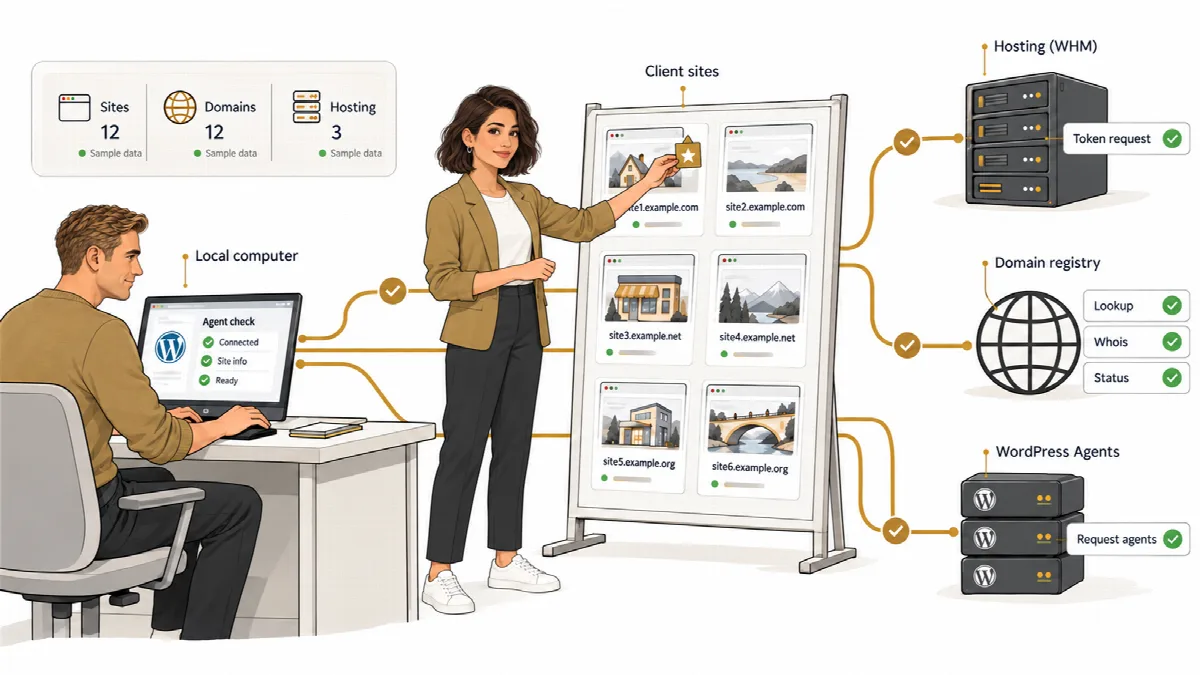
- The desktop application runs on a Windows computer. It contains everything it needs (PHP, a web server and a database), shows its interface in its own window and keeps working in the background while the window is closed.
- The Agent is a WordPress plugin that you install on every site. You connect a site once with a connection key that works only once. After that, ARN Connect checks the site, reads its inventory and, after your confirmation, sends signed commands such as updates or backups.
- Hosting and domains. ARN Connect reads your WHM servers with a WHM API token, and reads domain expiry dates from the registries (RDAP or WHOIS) and DNS.
- Clients and billing. Sites, domains and hosting accounts can be assigned to clients. ARN Connect prepares proforma invoices, quotations, reports and messages for them.
What ARN Connect covers
| Area | What you can do |
|---|---|
| WordPress sites | Checks every 5 minutes, health colours with reasons, inventory with history, incidents and monitoring gaps |
| Updates | Risk rating of every waiting update, verified updates with checks before and after, rollback copies, update lock |
| Backups | Backups of a whole site or only its content to your computer, incremental downloads, export of a restore package |
| Domains | Expiry dates, registrar, name servers and mail servers, reminders that become more frequent near expiry |
| Hosting | WHM accounts with disk, bandwidth and status, suspend and terminate with confirmation, SSL certificates and AutoSSL |
| Clients and billing | Client cards, products, recurring services, draft invoices, proforma invoices, quotations and payment reminders |
| Alerts and reports | Alerts only for things that need action, Windows notifications, email, webhooks, branded PDF reports and client messages |
| Security | Signed commands, a passive Agent, several connections per site with levels, a hash-chained audit log |
Who ARN Connect is for
- Hosting companies that watch WHM accounts, SSL certificates, domains and WordPress sites on their own servers with a root token, and bill the services they sell.
- Resellers who see and manage only their own hosting accounts with a reseller token, as WHM enforces.
- Agencies that keep client sites updated, backed up and reported without sharing WordPress passwords.
How ARN Smart sets it up for you
ARN Connect is not sold as a fixed package. The work follows these steps:
- Meet. A short call and a demo to see how you run hosting, domains, sites and billing today.
- Analyse your needs. Your WHM servers, domains, WordPress sites, products, currencies and the way you bill and report to clients are listed together.
- Adapt the panel. Products, invoice templates, languages, notification channels and client records are set up for your business.
- Install and connect. ARN Smart installs ARN Connect on the Windows computer you choose, connects your WHM servers and domains, and pairs your WordPress sites.
- Train your team. Your team learns the daily checks, verified updates, backups, invoices and client reports.
- Support. After go-live, ARN Smart stays your contact for questions, panel and Agent updates, and changes to your setup.
The scope of the adaptation and of the support is agreed with you before the work starts. To start, use the demo request form: Request a Demo.
Your data stays with you
ARN Connect stores monitoring data, client records, invoices, quotations, reports and backups in its own installation on your computer. It does not send them to ARN Smart's servers. ARN Connect has no licence key and no activation step. See Security and your data.
About this documentation
This documentation describes ARN Connect 0.12.4 with ARN Connect Agent 0.5.4. A few features need a recent Agent on the site; the articles say so where it matters.