
The site page and the Sites list let you keep the list of sites accurate and act on several sites at once.
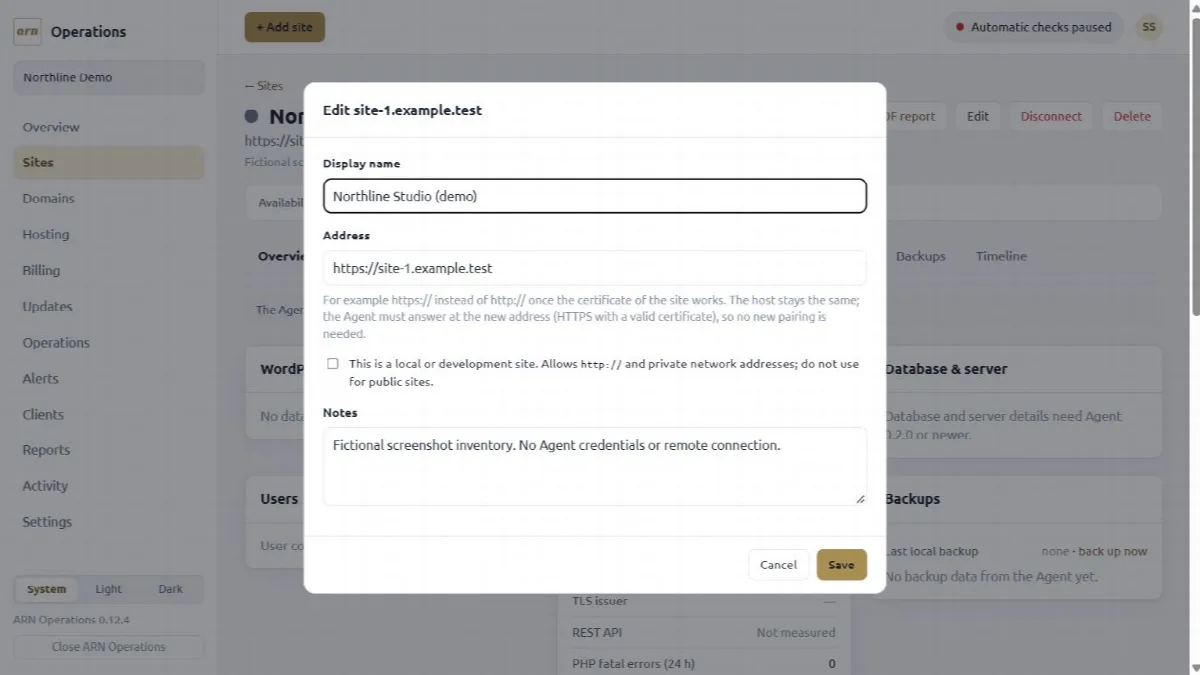
Edit a site
- Open the site and click Edit.
- Change the Display name, the Address, the This is a local or development site flag or the Notes.
- Click Save.
A new address must keep the same host, typically http:// to https:// once the site's certificate works. It is accepted only when the paired Agent answers at the new address and reports the same address, so no new pairing is needed. When you change an http:// address to https://, the local or development flag is turned off unless you set it yourself in the dialog.
Moving a site to another domain means deleting it and adding it again with a new connection key, because Edit keeps the host.
Switch to https
When a site added with http:// starts redirecting to https:// on the same host, its page says so and offers Switch to https. It changes the address in one step, after the same check with the Agent as Edit.
Disconnect or delete a site
| Action | What happens |
|---|---|
| Disconnect | ARN Connect asks the Agent to forget this installation and stops monitoring the site. The site's history stays in ARN Connect. The plugin stays installed. |
| Delete | ARN Connect first disconnects, as above, then deletes the site and its history (timeline, checks, updates, operations and the list of its backups). The audit log keeps its entries. This cannot be undone. |
To delete a site:
- Open the site and click Delete.
- Optionally tick Also delete the local backups and exports of this site on this computer. Otherwise their folders stay in the backup folder.
- Type the host of the site to confirm and click Delete site.
The site is deleted in ARN Connect even when the Agent cannot be reached. A site cannot be deleted while an operation, backup or export of it is running.
Act on several sites
On the Sites list, tick the sites, or tick the box in the header to select all shown sites. A bar with these actions appears:
- Assign client… assigns the selected sites to one client.
- Remove client removes their client.
- Check now checks them at once.
- Back up… backs them up one at a time, each with the scope it remembers; a notification says when the batch is finished.
- Clear selection clears the ticks.
The result names every site that was skipped, with the reason. The actions apply to the sites the current filter shows.