
On your own WHM servers, ARN Connect lists the SSL certificate of every domain of your hosting accounts and works with cPanel's AutoSSL, the free certificate service built into cPanel. ARN Connect does not issue certificates itself.
Where to find it: Hosting → SSL, and the SSL card on each account page.
Before you start
The SSL list and the account's SSL card need the cpanel-api privilege on the WHM API token. See Connect WHM servers and manage hosting accounts.
Certificates and private keys never pass through ARN Connect; only their dates and names are stored.
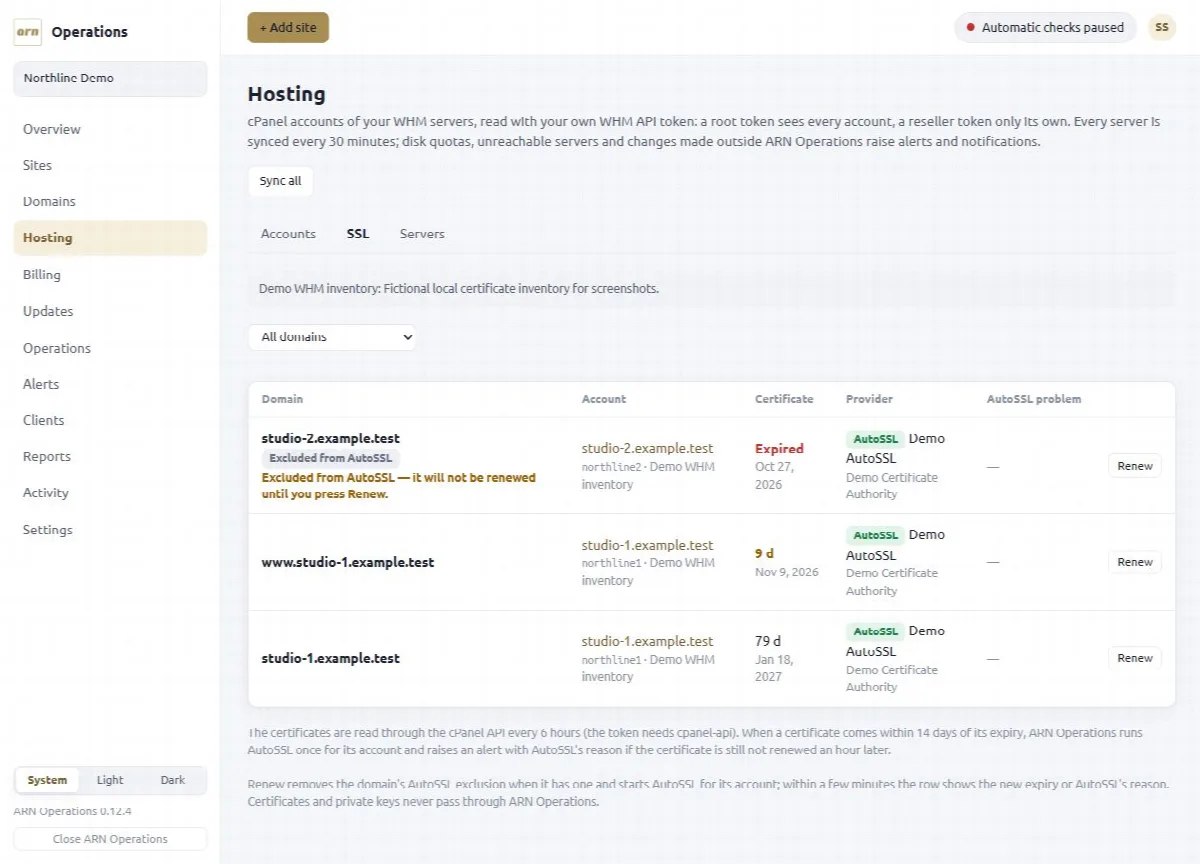
The SSL list
For every domain, the list shows the account, the expiry date and days left, the issuer and provider, whether AutoSSL issued it, whether it is self-signed or excluded from AutoSSL, and AutoSSL's last problem, for example DNS pointing elsewhere.
- Filter with All domains, Expiring within 30 days or Problems.
- Each account is read every 6 hours, and every 2 minutes while AutoSSL runs.
- Suspended accounts are not read (cPanel does not list their certificates); the list says how many are left out.
Expiring certificates also appear in Expiring soon on the Overview, and the Sites list marks sites on your servers with AutoSSL or WHM.
Automatic AutoSSL run
When a certificate comes within 14 days of its expiry, ARN Connect starts AutoSSL once for its account. If the certificate is still not renewed an hour later, one alert per account names the reason.
To start AutoSSL yourself, open the account page and click Run AutoSSL now on its SSL card.
Renew a certificate
Every row of the SSL list has Renew:
- Click Renew and confirm.
- If the domain is excluded from AutoSSL in cPanel, ARN Connect includes it again, together with its
www.name. - AutoSSL starts for the account, and the account is read again every 2 minutes for up to 30 minutes.
- The row then shows the new expiry date, or AutoSSL's problem in plain words.
Every step is written to the audit log. No WHM privilege beyond cpanel-api is needed.
Excluded domains. A certificate whose domains are all excluded from AutoSSL is not renewed automatically. The list marks it Excluded from AutoSSL until you click Renew. When such a certificate expires within 30 days, its row says so and names an account that already holds a renewed certificate for the same names, if there is one.
Sites on other hosting
For sites that are not on your WHM servers, ARN Connect only monitors the certificate: its expiry date and issuer are checked every 5 minutes, and a certificate that expires within 14 days turns the site yellow. See Monitor WordPress sites.