
Every business card that a person keeps gets its own card page. The page is the digital business card the person shares instead of a paper card.
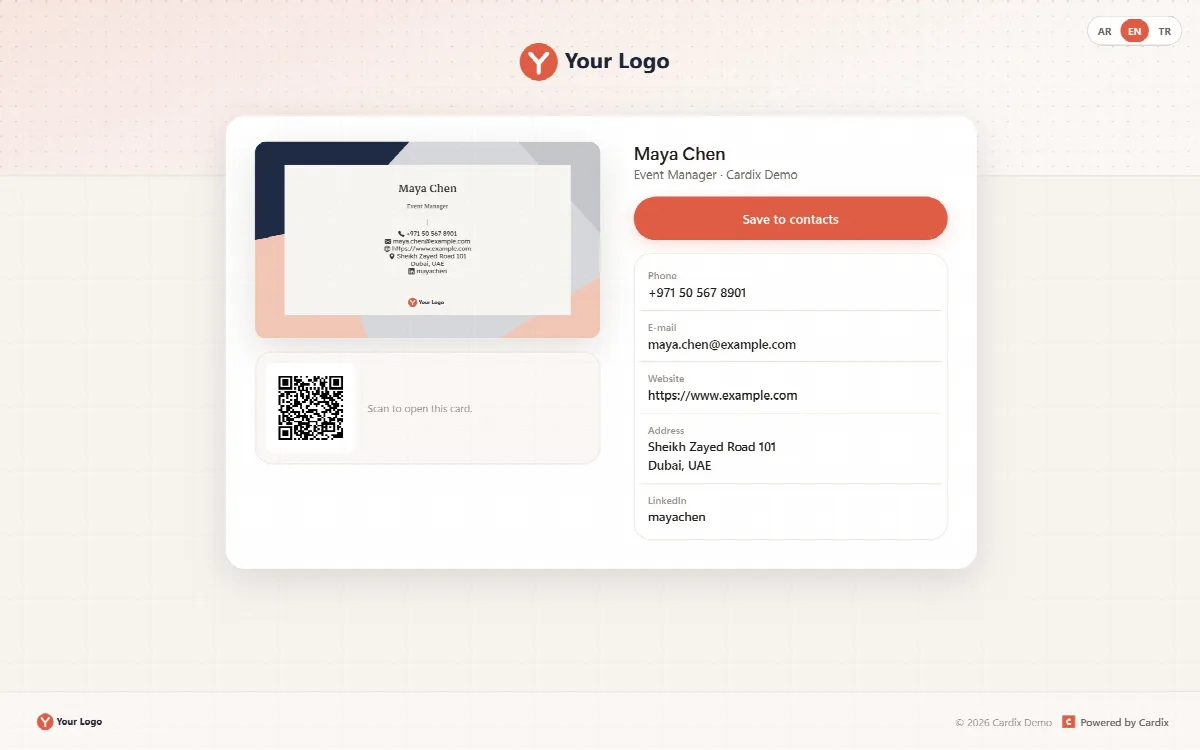
What the card page shows
- The card image.
- The name, title and company of the person.
- Clickable phone, e-mail, website, address and social media links. The address and the city open one map search.
- Save to contacts, which downloads a contact file (
.vcf). - The QR code of the page with "Scan to open this card."
On a desktop, the card and the QR code sit next to the name and the links; on a phone, everything stacks in one column. The page uses the same frame as the other participant pages (logo, AR / EN / TR language switch and footer) and the page settings of the group (Settings, box Card page).
Open and share the card page
- The person finds the address and the QR code in the result panel under Your card page.
- In the admin panel, click Card page next to a card on the People tab.
- The card page opens without the PIN of the group, so the person can share it freely.
The contact file (vCard)
Save to contacts downloads a vCard file that phones and e-mail programs can import.
| On the card | In the contact file |
|---|---|
| Name | The name of the contact |
| Title | The job title |
| Company | The organization |
| Phone, e-mail, website, social media and address | Added as contact details |
The name, title and company fields of a business card group always go into the contact file this way. The card page, the contact file and the e-mail signature include only the contact details set to show on the card (On the card on the Fields tab).
Checked e-mail addresses
E-mail addresses that contain ?, &, %, #, / or \ are refused, so a mail link cannot add hidden recipients or a subject. An address saved earlier that breaks this rule is not shown on the card page, in the signature or in the contact file.
Good to know
- The QR code belongs to the card page. It is shown on the card page and in the result panel; it is not printed on the card image.
- Cardix makes digital cards: images, the card page, the contact file and the e-mail signature. It does not produce print files.
- When a card is deleted, its card page closes.