
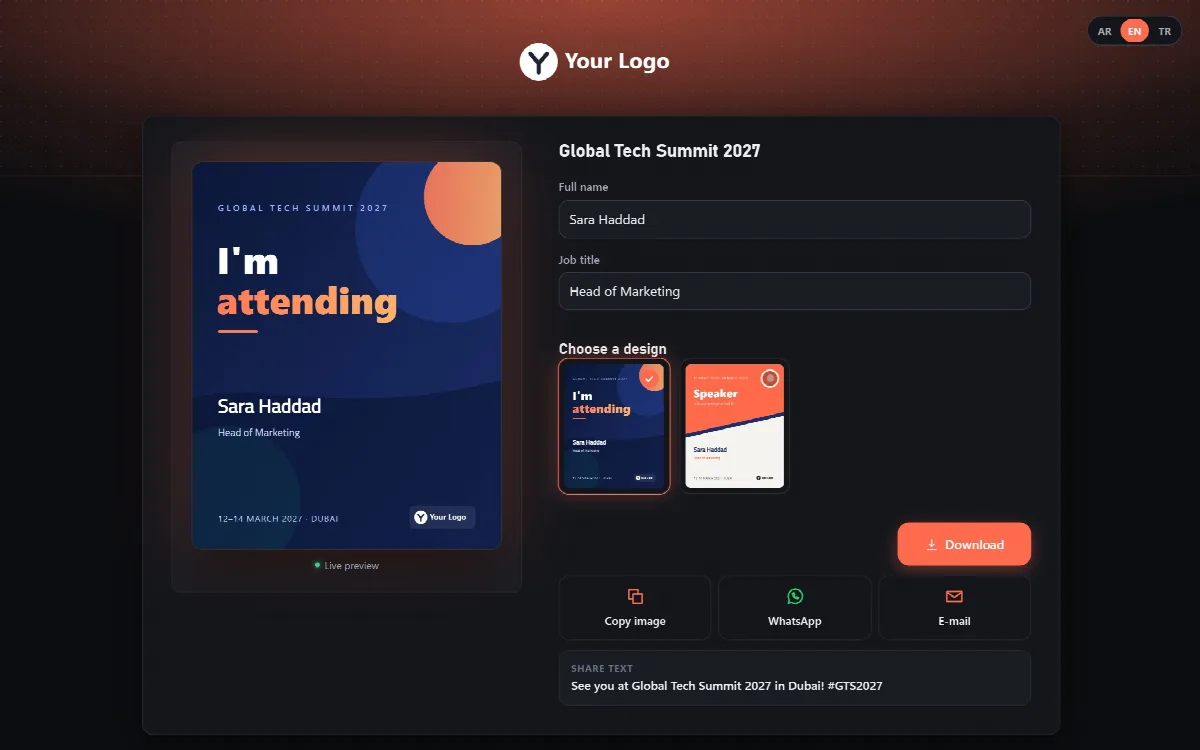
Cardix is a platform by ARN Smart that you install on your own web hosting. You prepare the card designs once in its admin panel; participants open a page, type their details and download a card made for them.
Cardix is a standalone PHP application with its own admin panel. It is not a WordPress plugin. It runs in its own folder and keeps its data in files there, so it needs no database server.
What you can do with Cardix
- Event cards. Holiday and national day greetings, "I'm attending" cards for conferences, speaker cards. Participants type their name, choose one of the event's designs and download or share their own card.
- Invitations. One private link for all guests with the invitation image, the date and the place, an "Add to calendar" file and, if you want, guest replies.
- Business cards and e-mail signatures. Card groups for a team. Each person gets a card image, a card page with a QR code and a contact file (vCard), and an e-mail signature made of linked images.
How Cardix works
- Install Cardix on your server. Upload the install ZIP, open its setup page and enter the activation code from your licence e-mail.
- Create an event or a card group. Choose the fields, their languages and when the event is open. For staff business cards, create a card group.
- Prepare the designs. Upload your own design images or copy a ready template, then place the boxes for the texts and the logo in the Template Editor.
- Share the link. Participants open the participant page or a private link, type their details and download their card.
The text of every card is drawn in the participant's browser with the same rules as in the Template Editor; the server then combines it with the design and the logo. Arabic letters join correctly, each text keeps its own writing direction and every card keeps the approved layout.
Languages
- The setup, the admin panel and the participant pages are available in Arabic, English and Turkish. The Arabic pages read from right to left.
- Each text field of a card can be set to one of 54 languages, with its own writing direction and font.
Who uses Cardix
- Companies and institutions send holiday and national day greetings that every employee personalizes with one approved design.
- Conferences and events let attendees and speakers make their own card in seconds.
- HR and communication teams issue business cards, card pages and e-mail signatures for the whole staff, for example from one CSV file.
- Wedding and event planners send one invitation link with the date, the place, a calendar file and guest replies.
One product, one licence
Cardix is a single product. There is no Free edition and no demo. Events, invitations, card groups, the Template Editor, ready templates, fonts, statistics, several administrator accounts with roles and the installable participant page are all part of the same licence. A licence is for one installation.
Cardix runs on your own hosting, so the cards, the images and the collected participant data stay on your server.
About this documentation
This documentation describes Cardix 3.1.2.
Cardix 3 is a new product line with its own licence and its own install package. Cardix 2.0.0 installations are not updated to Cardix 3; their data comes into a new Cardix 3 installation with Import from Cardix 2. See Update Cardix and move from an earlier version and Import your data from Cardix 2.