
Public events are listed on the participant page. Invitations and card groups are different: they open only with their private link, so only the people you send it to can use them.
Where to find it:
- Invitations: Events → your invitation → Access tab.
- Card groups: Cards → your group → Settings, box Access.
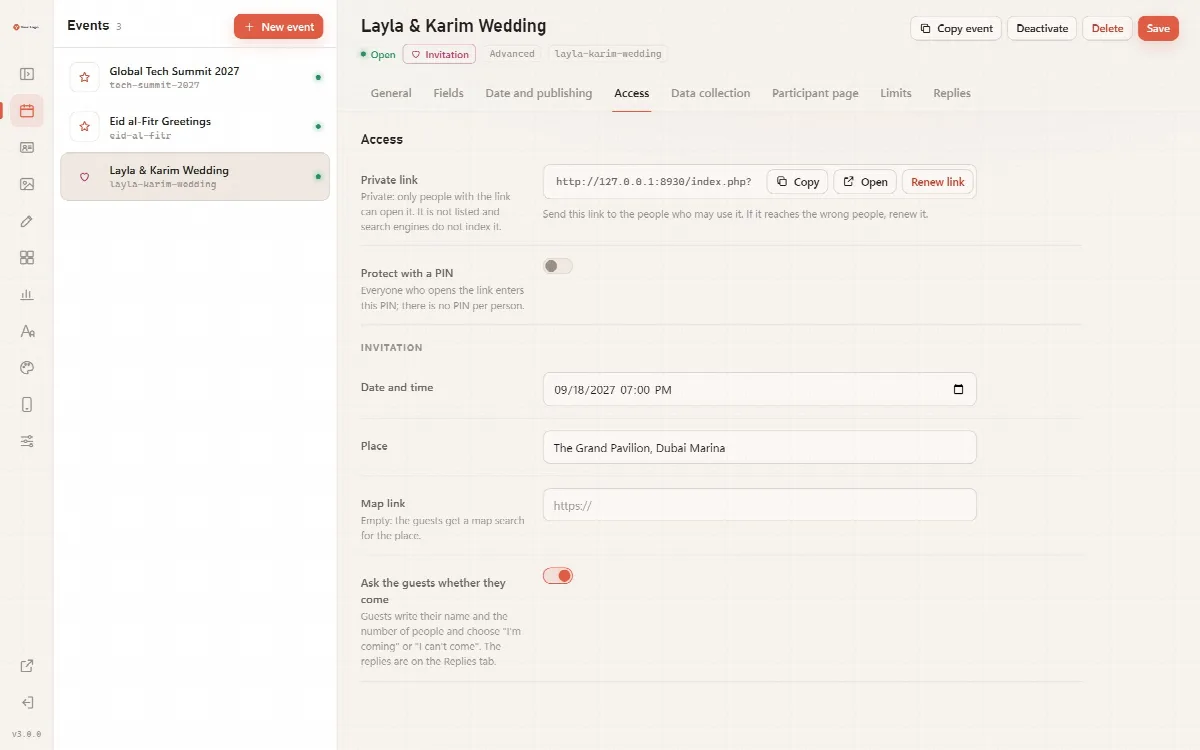
The private link
Cardix makes the private link when you save the invitation or the group for the first time. The link:
- is random (24 characters) and cannot be guessed;
- is not listed on the participant page;
- is closed to search engines and caches.
Next to the link you find Copy, Open and Renew link. A card group also has Copy link in its header.
Send the link only to the people who may use it. A public event has no private link: its address is index.php?event= followed by the key, for example https://cards.example.com/index.php?event=eid2025.
Renew the link
Renew link makes a new link after you confirm: "Make a new link? The old link and every page opened with it stop working at once." Visitors with the old link see Link not found. Use it when a link reached the wrong people.
Protect the link with a PIN
- Switch on Protect with a PIN.
- Enter the PIN (6 to 8 digits).
- Click Save.
Everyone who opens the link enters this PIN; there is no PIN per person. Visitors see "This page is protected. Enter the PIN you were given." and click Open. To keep the PIN that is set, leave the field empty when you save; to change it, enter a new PIN.
A PIN set before PINs needed 6 digits shows a warning in the panel: switch to a PIN of at least 6 digits.
Wrong PINs
| Situation | What happens |
|---|---|
| 5 wrong PINs from one visitor within 15 minutes | That visitor is blocked for 15 minutes: "Too many wrong PINs. Please try again in 15 minutes." |
| 50 wrong PINs from all visitors within an hour | The PIN page of the event closes for an hour, and the panel shows a warning under the PIN field |
If the PIN page closes again and again, renew the link and the PIN.
Good to know
- If you add a PIN later, visitors who had already opened the private link keep their access until you renew the link.
- The card page of a person in a card group opens without the group's PIN, so the person can share it. Sharing from a card group shares the card page, never the group's private link.
- A private link is never put into a message that participants share from the page.