
Plugin Review checks plugin packages before WordPress installs, updates or activates them. Clean packages continue; uncertain ones wait until a security approver has looked at them. Every decision is bound to the exact files that were reviewed.
Where to find it: ARN SiteWatch → Plugin Review, with the tabs Installed Plugins, Pending Reviews, Trusted Sources, Accounts & Permissions and Activity History.
Before you start
A security approver must be designated, or every plugin installation and update from a WordPress account waits. (SiteWatch 2.0.1 and later) The reason shown is No security approver is designated yet. See Complete the security setup.
What SiteWatch checks
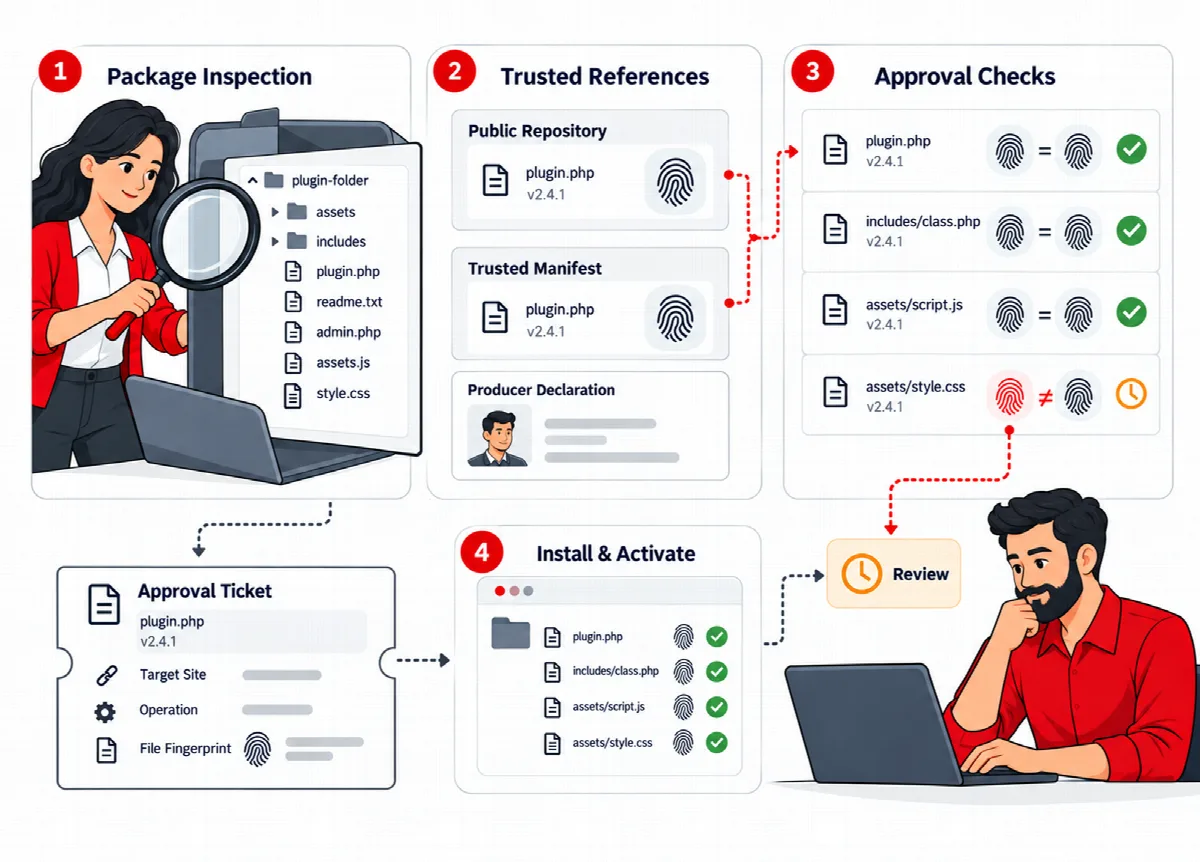
When a plugin is installed or updated through WordPress, SiteWatch opens the package before any file is copied:
- The package must contain exactly one plugin and only regular, safely named files.
- Every file is fingerprinted and checked for supported suspicious code patterns.
- If an exact reference for that version exists (a WordPress.org reference or a manifest you imported), the files are compared with it.
- Inspection handles packages of up to 15,000 files within a 60-second budget. (SiteWatch 2.0.2 and later) Each file can be up to 32 MB and the package up to 512 MB in total (earlier versions stopped at 8 MB and 96 MB), and SiteWatch keeps plugin ZIPs of up to 128 MB for review.
- If a package exceeds a limit, the message Package inspection stopped names the limit and says that no files were installed. (SiteWatch 2.0.2 and later) It also says what to do: for a size limit, download the plugin again from its publisher and, if it is still that large, send the message to ARN Smart support at support.arnsmart.com; for a time limit, try again and, if it stops again, ask your host to let PHP requests run for at least 195 seconds (
max_execution_time).
When a plugin is activated, SiteWatch checks the installed files again.
Plugin Review covers plugins. Theme installations and activations follow WordPress's own permission checks; theme files are covered by File Integrity and File Changes.
When an operation can continue directly
An operation continues without waiting when:
- the package is clean (no flagged pattern, no difference from an available reference), and
- the person is a security approver with an Authenticator-verified session, or an administrator with active 24-hour permission.
This includes commercial ZIPs that have no public reference. A missing public reference alone does not hold a clean package. See Security approvers, verified sessions and 24-hour permissions.
Why an operation waits
A held operation stops with the message SiteWatch paused this operation and the reason. Possible reasons:
| Reason | What to do |
|---|---|
| This WordPress session needs Authenticator verification. | Verify the session once with Verify this session |
| This account needs permission from a designated security approver. | Ask an approver for 24-hour permission, or let the approver install it |
| Supported suspicious code patterns need review. | Review the flagged code before approving |
| Package files differ from the available same-version reference. | Check where the package came from |
| The download does not match this plugin's trusted update channel. | Check the update source |
| Installed files differ from the previous package decision. | Review the file change before activation; signing in again does not resolve it |
| No security approver is designated yet. (SiteWatch 2.0.1 and later) | Designate an approver first |
An uploaded ZIP that waits is kept for up to 48 hours in private temporary storage outside WordPress, so the approver can install it without uploading it again. Pending requests expire after 48 hours.
Approve a held operation
- Open Plugin Review → Pending Reviews. Each request shows the plugin and version, the declared producer, the number of files and flagged patterns, the operation, the requesting account and the file fingerprint.
- Read Why this operation needs review.
- Tick I approve this displayed package and operation, including its source uncertainty and any flagged patterns.
- For an installation, optionally tick Also permit activation of these exact files after installation. Without it, a new plugin stays inactive.
- If your session is not verified yet, enter a fresh authenticator code.
- Click Approve and install retained package (for an uploaded ZIP that SiteWatch kept) or Approve exact operation.
The approval covers exactly these files, this operation and this target, and is valid once for 15 minutes. If the files change, a new reason appears or the approver loses approval authority, the operation needs a new review. A package with a different content never inherits an earlier approval because it has the same name.
If an approved installation was interrupted, Resume approved retained installation continues it within the 15 minutes without another approval.
Remove a request
Click Remove request to remove a pending request and cancel any unused approval. Installed plugins are not changed, and the action stays in the history.
Updates and activations
- An update that is refused does not touch the installed plugin; it keeps working.
- Approved updates keep the plugin's activation state and use WordPress's temporary backup and rollback.
- Plugins installed through the REST API must be installed inactive first and activated separately.
- Single-file plugins that are not in their own folder need staging review before activation.
Installed Plugins and Activity History
- Installed Plugins lists every plugin with its Version, the Recorded decision for its files and its saved Update source. A recorded decision is evidence for those files, not a guarantee for future versions.
- Activity History shows the latest 100 package and permission events of the site, including removed requests.
What Plugin Review cannot intercept
Plugin Review works through WordPress's own installation, update and activation routes. Files written over FTP or the hosting file manager, custom installers that bypass WordPress, must-use plugins, drop-ins and direct database changes are not held. Scheduled file inspection and file integrity checks find such changes afterwards.