
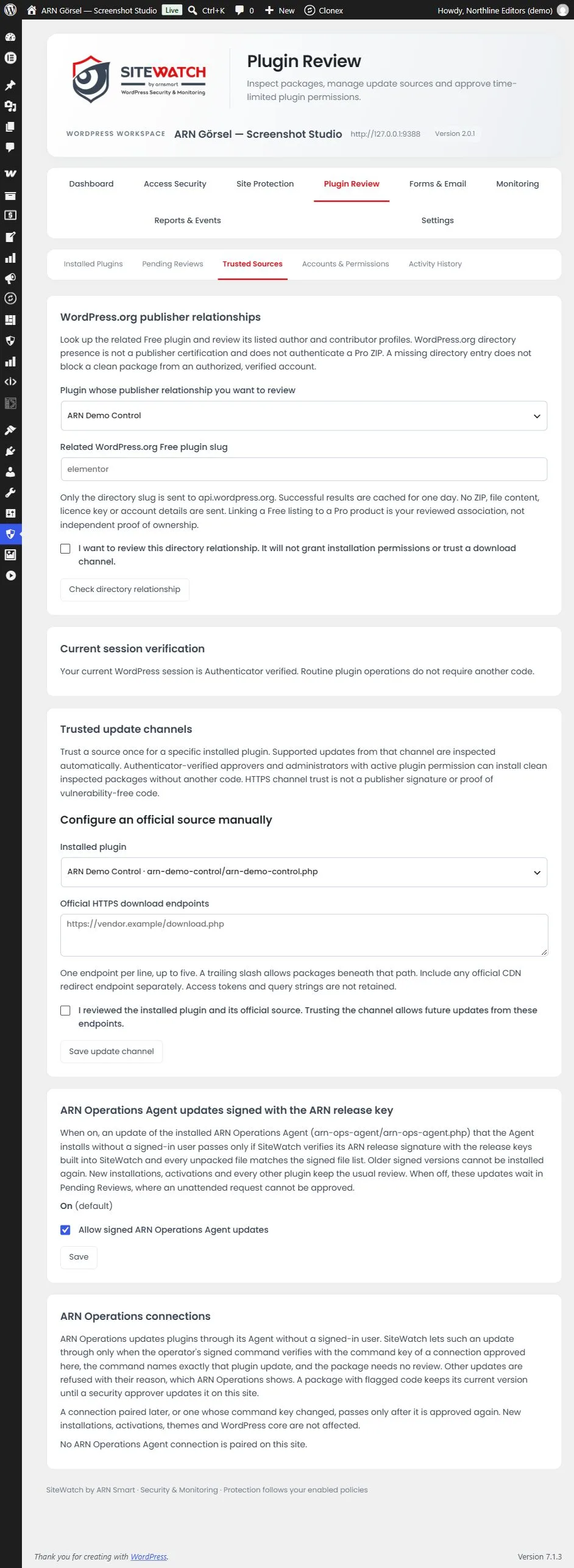
Trusted Sources decides which update sources SiteWatch accepts without a manual review of each package. Every update from a trusted source is still inspected.
Where to find it: ARN SiteWatch → Plugin Review → Trusted Sources. Only a security approver can change these settings.
Trusted update channels
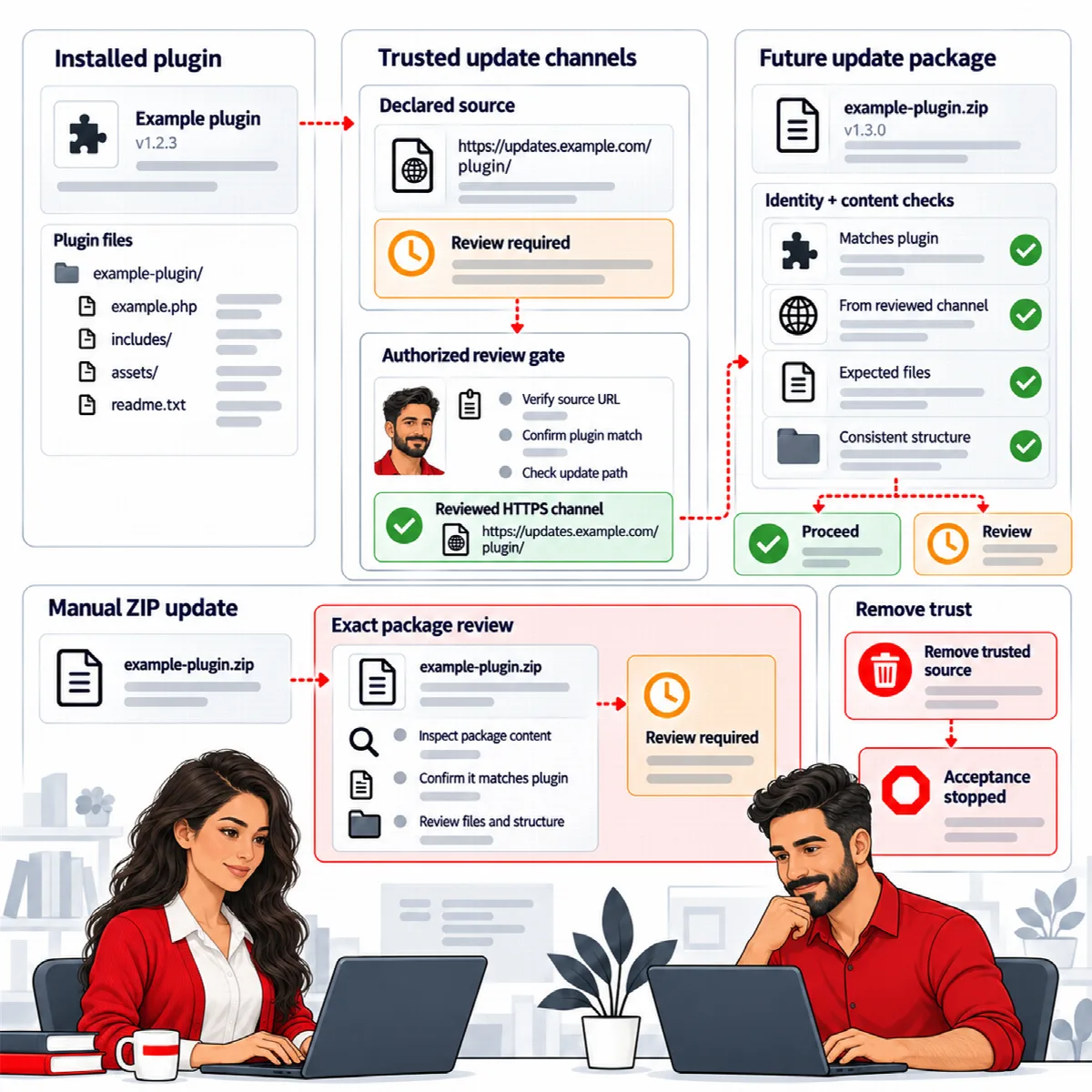
A trusted update channel is an official HTTPS download address for one installed plugin, such as the update server of a commercial plugin. Later updates from that address can be installed automatically when they pass inspection.
Review declared sources together
Plugins often declare their own update address. When SiteWatch finds such declarations, it lists them under Review declared update sources together.
- Tick the plugins whose displayed source you recognize. Up to twenty can be approved at once.
- Tick I reviewed these installed plugins and the displayed sources. I permit future supported updates from the selected channels.
- Click Approve selected update channels.
A declared address is only a suggestion from the plugin itself. It is never trusted automatically.
Configure an official source manually
- Under Configure an official source manually, choose the Installed plugin.
- Enter the Official HTTPS download endpoints, one per line, up to five. A trailing slash allows packages beneath that path. Add an official CDN redirect address as a separate line.
- Tick I reviewed the installed plugin and its official source. Trusting the channel allows future updates from these endpoints.
- Click Save update channel.
Access tokens and query strings in the addresses are not stored.
How trusted channels work
- Updates from a trusted channel are still inspected: file structure and content, the target plugin and the installed files afterwards.
- ZIP files that someone uploads manually always go through the exact package review, even for a plugin with a trusted channel.
- Each channel shows Approved update channel, or Inactive: the original approver is no longer authorized if the approver who trusted it lost that role.
- To stop trusting a channel, tick Revoke this plugin's trusted update channel and click Revoke channel.
HTTPS channel trust is not a publisher's release signature and does not prove that a package has no vulnerability.
WordPress.org publisher relationships
Commercial plugins often have a free version on WordPress.org from the same publisher. You can record that relationship as extra information:
- Under WordPress.org publisher relationships, choose the Plugin whose publisher relationship you want to review.
- Enter the Related WordPress.org Free plugin slug, for example
elementor. - Tick I want to review this directory relationship. It will not grant installation permissions or trust a download channel.
- Click Check directory relationship.
SiteWatch reads the author and contributor profiles of that WordPress.org plugin, sending only the slug. Results are kept for one day. The relationship is informational: it does not prove that a commercial ZIP is genuine and does not allow an installation. If the directory details change, the relationship asks for review again.
Signed ARN Connect Agent updates
Its Agent is listed as ARN Connect Agent on the Plugins screen (SiteWatch 2.0.1 and ARN Connect Agent 0.5.4; earlier versions use the name ARN Operations). The ARN Connect Agent can install its own update without a signed-in user. The setting ARN Connect Agent updates signed with the ARN release key controls this. It is On by default.
When it is on, SiteWatch lets such an Agent update through only if the ARN release signature checks out with the release keys built into SiteWatch and every unpacked file matches the signed file list. An older signed version cannot be installed again. When it is off, these updates wait in Pending Reviews, where an unattended request cannot be approved.
To change it, tick or untick Allow signed ARN Connect Agent updates and click Save.
Signed ARN Pro releases (SiteWatch 2.1.0 and later)
ARN Pro plugins, SiteWatch among them, download their updates through ARN Center. Each release carries the ARN publisher signature. SiteWatch checks that signature itself, with the release keys built into SiteWatch, and checks that the downloaded ZIP has the signed SHA-256 and size and holds exactly the inspected files. A newer release that passes is recorded with the evidence Signed ARN release followed by the product, the version and the publisher key.
Like an update from a trusted channel, such a release can be installed without a signed-in user when the package is clean and its plugin has an approved record. A package with review reasons still waits for a security approver, and an older signed version is not vouched for.
ARN Connect connections (SiteWatch 2.0.1 and later)
ARN Connect can update plugins on your site through its Agent, without a signed-in user. SiteWatch lets such an update through only when:
- a security approver approved the connection under ARN Connect connections;
- the operator's signed command checks out with the command key of that connection;
- the command names exactly this plugin update and its versions;
- the package needs no review.
Each connection shows its state: Approved, Not approved, Key changed or Key unreadable.
- Review the connection name, ID and command key.
- Enter a Fresh authenticator code.
- Click Approve this command key. To withdraw it later, click Revoke approval.
A connection that is paired again, or whose command key changed, shows Key changed and passes only after a new approval. Refused updates are not queued, and ARN Connect shows the reason. A package with flagged code keeps its current version until a security approver updates it on the site. New installations, activations, themes and WordPress core are not affected by this rule.
This works with ARN Connect Agent 0.5.4 or later.