
Company Data is the central record of your site's company, contact, legal and social details. Widgets, the Header & Footer Builder, shortcodes, Elementor Dynamic Tags, the contact button and structured data read the values when a page is shown, so one change in Company Data reaches every place that uses it.
Where to find it: ARN Vendix → Company Data (Pro) or ARN Utilities → Company Data (Free). The screen has three tabs: Company Information, Legal Information and Social Media.
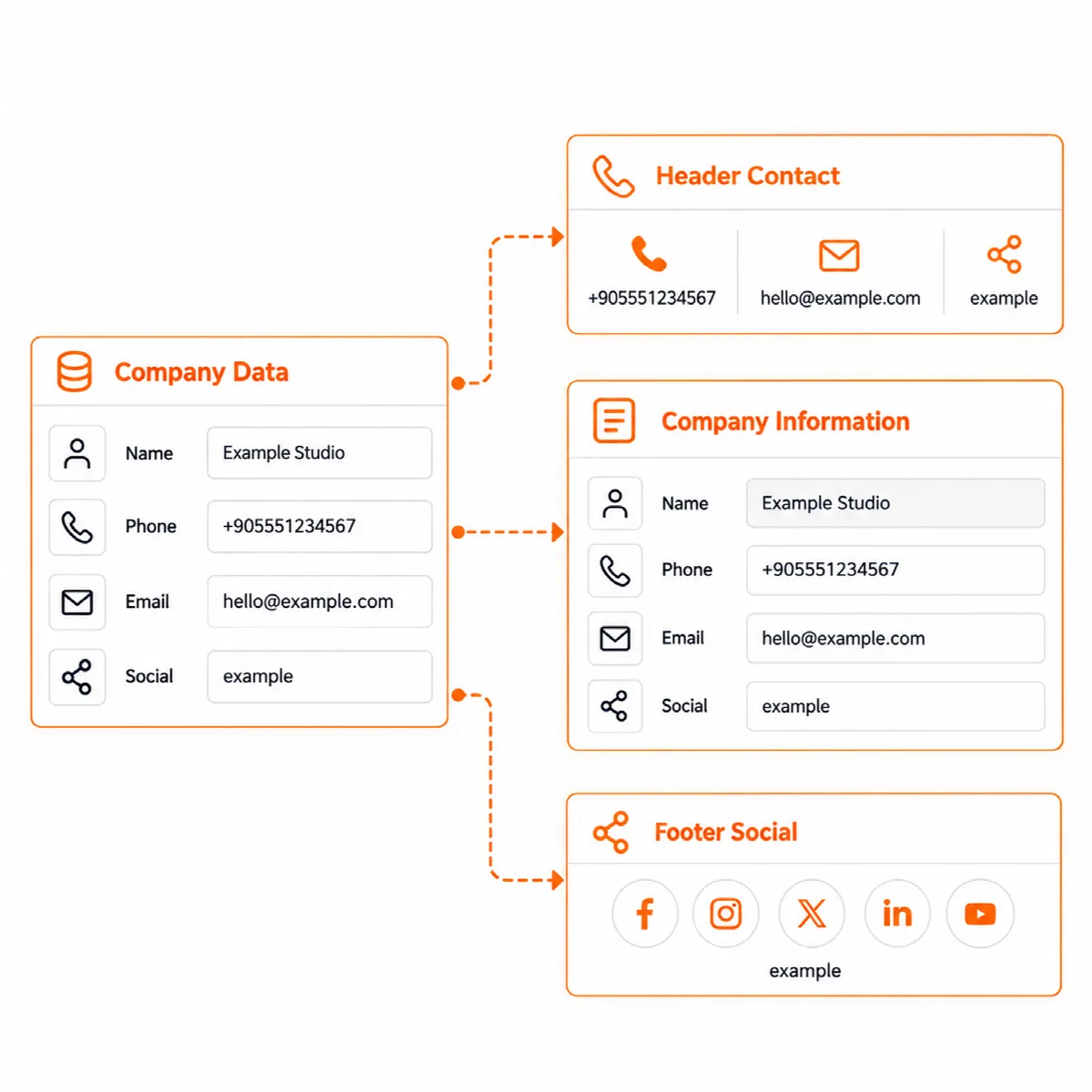
Fill in your details
- Company Information: site name, company email, site URL, company full and short name, company address, Phone 1 and Phone 2, company logo, WhatsApp number, working hours and map URL.
- Legal Information: the legal company name and the registration details (see below).
- Social Media: the profile addresses for Facebook, Instagram, LinkedIn, X, YouTube and TikTok.
- Click Save Vendix Settings.
The company email starts empty. It never falls back to the WordPress admin email. Until you fill it in, the header and footer, the Company Information widget and structured data show no email address.
Legal details by country (Pro)
In Vendix Pro, choose the Country of registration. The screen shows that country's fields:
| Country of registration | Fields |
|---|---|
| Türkiye | Tax office, tax number, trade registry number, MERSIS number, chamber registration number |
| Saudi Arabia | Commercial registration (CR) number, VAT registration number |
| Another country | Tax or VAT number, company registration number |
Values of fields another country does not use are kept when you switch. Labels follow the country, for example "VAT Number" and "Commercial Registration (CR)" for Saudi Arabia. Vendix stores and shows these details; it does not check them with a registry or decide which details your business must publish.
Vendix Free has one set of legal fields: legal company name, tax office and tax number, trade registry number, MERSIS or company registry ID and chamber registration number.
Show the values with shortcodes
Each field has its own shortcode. In Vendix Pro, the common ones are:
| Shortcode | Shows |
|---|---|
[site_name], [site_mail], [site_link] | Site name, company email, site URL |
[company_name], [company_name_short], [company_legal_name] | Company names |
[company_address], [company_hours], [company_logo] | Address, working hours, logo address |
[company_phone] | Both phone numbers as tel: links |
[company_whatsapp], [company_map] | WhatsApp link, map link |
[company_tax], [company_trade_registry], [company_mersis], [company_chamber] | Legal numbers |
[company_social network="instagram"] | One social profile |
[current_date] | Today's date in the site's time zone and date format |
Each of these also works with an arnmrtvndx_ prefix, for example [arnmrtvndx_company_phone]. Three flexible shortcodes cover every field:
[arn_company field="company_address" link="auto" multiline="yes"]with fallback, format, link, label, multiline and target options.[company_value field="company_name" fallback="Company"]returns any field, with a value to show while it is empty.[company_link type="whatsapp" label="Contact us"]builds a phone, email, WhatsApp, map, website or social link.
In Vendix Free, the shortcodes have an arnsmesu_ prefix, for example [arnsmesu_company_phone], [arnsmesu_company_value field="company_name" fallback="Company"] and [arnsmesu_company_link type="whatsapp"].
In the Elementor editor, the Add Shortcode button of the text editor lists the Company Data fields in groups, with search, and inserts their shortcode.
Use the values in Elementor
Three Elementor Dynamic Tags work in native Elementor widgets too, each with an optional fallback:
- Company Value for text fields.
- Company Dynamic Link for the phone, WhatsApp, email, map, website or one social profile as a link.
- Company Logo for image fields.
Vendix widgets such as Company Information, Get in Touch, Business Hours, Site Logo and Contact Cards read Company Data directly. In the Company Information widget, administrators see a "Fill this in Vendix → Company Data" note where a value is missing; visitors see nothing.
Where else the record is used
- Header & Footer Builder: contact elements and the placeholders
{phone},{phone2},{email},{address},{company},{site}and{year}. - Floating Contact (Pro): WhatsApp, phone, email and map when the button's own fields are empty.
- Quick Buy Buttons (Pro): "Ask on WhatsApp" and "Order on WhatsApp" use the WhatsApp number and stay hidden until one is added.
- ARN Hero — Fashion and Parallax, ARN Social Counter (Pro): the social profiles.
- Structured data: with SEO & Visibility on, the company name, legal name, phone, email, address, logo, social profiles and the tax and registry numbers fill the Organization schema, unless you set other values there.
- PDF documents and checkout contracts (Pro): the seller's details.
Phone and WhatsApp numbers keep their left-to-right order on right-to-left pages.
Update a detail
- Change the value in Company Data and save.
- Check a page with the header, the footer and a contact widget, and test the phone, email and map links.
- Clear your page cache so that cached pages show the new value.
Text typed by hand elsewhere does not follow Company Data; only the connected outputs do.