
SEO & Visibility can publish your SEO metadata, robots directives, social tags, JSON-LD schema and an XML sitemap, and it analyses the content each page really shows. It does nothing until you turn it on, and it steps back when another SEO plugin is active.
Where to find it: ARN Vendix → SEO & Visibility (Pro) or ARN Utilities → SEO & Visibility (Free). In Vendix Pro the tabs are grouped as Search Engines (SEO & Analysis, Sitemap, Schema, Redirects) and Answers & Insights (AEO / GEO / AIO, Report, Search Intelligence, Content Freshness).
Before you turn it on
Decide which plugin owns your public SEO output. While Yoast SEO, Rank Math, SEOPress, All in One SEO or The SEO Framework is active, Vendix leaves metadata, schema, robots and sitemap output to that plugin and keeps only its analysis. On pages that ARN Contix publishes, Contix owns the schema and Vendix prints the title, description and social tags Contix writes into the Vendix fields.
Turn on the engine
- Open SEO & Visibility and turn on Enable ARN Smart SEO & Visibility Engine. Turn it on only when Vendix should manage the site's visibility layer.
- In SEO & Analysis, choose what to publish: Enable ARN SEO output, Enable SEO / GEO / AIO readiness scoring and Output Open Graph and X/Twitter metadata.
- Set the Default title template (use
%title%and%sitename%; leave empty for the WordPress default), the Default meta description, the Default social sharing image, the X/Twitter site account and the Default robots. - Click Save Vendix Settings.
AI Media has its own switch and works independently of this engine.
Set up the sitemap
In the Sitemap tab, nothing enters the sitemap just because a plugin registered a public content type; you choose each source:
- Turn on Enable ARN-controlled WordPress sitemap.
- Choose the Content types included and the Taxonomy archives included, and whether to Include author archives.
- Keep Automatically exclude noindex content on, and list any Excluded content IDs.
- Set the Maximum URLs per sitemap part (100 to 2,000).
- Save and open the sitemap address shown on the tab.
Password-protected content and builder templates are always left out.
Set up the schema
In the Schema tab, turn on Enable JSON-LD schema, Output WebSite schema and Output breadcrumb schema. The organization fields (name, legal name, URL, logo, schema type such as Organization, LocalBusiness or Corporation, phone, email, address, founding date, price range, languages, areas served and contact point) are optional overrides: empty fields use your Company Data, including country-specific tax and registry numbers.
Vendix builds one connected JSON-LD graph with WebSite, the organization and the page type chosen for each page: WebPage, AboutPage, ContactPage, CollectionPage, Service, Product, SoftwareApplication, Article, BlogPosting or NewsArticle. BreadcrumbList follows the trail of the ARN Breadcrumbs widget, or Vendix Theme's trail, and a page that shows no breadcrumbs gets none. The FAQ widgets of a page share one FAQPage.
Structured data added in Vendix 3.0.0
- Dynamic Content records (Pro): a content type with a schema type adds its own node, filled from its fields, to the graph on each record's page, unless the record's SEO box chooses a schema type.
- Live coverage (Pro): a live post becomes LiveBlogPosting with its updates and its coverage times.
- Corrections and updates: the newest note of a post sets its
dateModified, never earlier than the publication date. - ARN Rating Badge: with Add Rating Schema on (off by default), the widget prints AggregateRating structured data for a product or a software application. Use it only for ratings collected from customers.
- Product questions (Pro): the answered questions shown in a product's Questions tab are added to the product's structured data.
The Dynamic Content node, live coverage and the date of the notes join the graph that SEO & Visibility prints, so they need the engine and Enable JSON-LD schema on. See Create content types and listings with Dynamic Content and Reading analytics, topic following, briefings, live coverage and corrections.
Set the SEO of a page
With the engine on, each page and post has an ARN Smart Visibility Engine box:
- Write the SEO title and the meta description.
- Set the canonical URL and robots directives if the page needs them.
- Check the sharing preview, choose the sharing image and review the title and description as they will appear when the link is shared.
- Choose the schema type of the page.
- Read the analysis and its recommendations, then update the page.
Robots and "Discourage search engines"
Vendix adds its directives to the one robots tag WordPress prints, so directives from WordPress and other plugins stay and a noindex from any source wins. Search results and 404 pages are never indexed. While Discourage search engines from indexing this site is checked in Settings → Reading, every page gets noindex, nofollow, and the SEO & Visibility screen shows a warning with a link to the Reading settings.
Content analysis
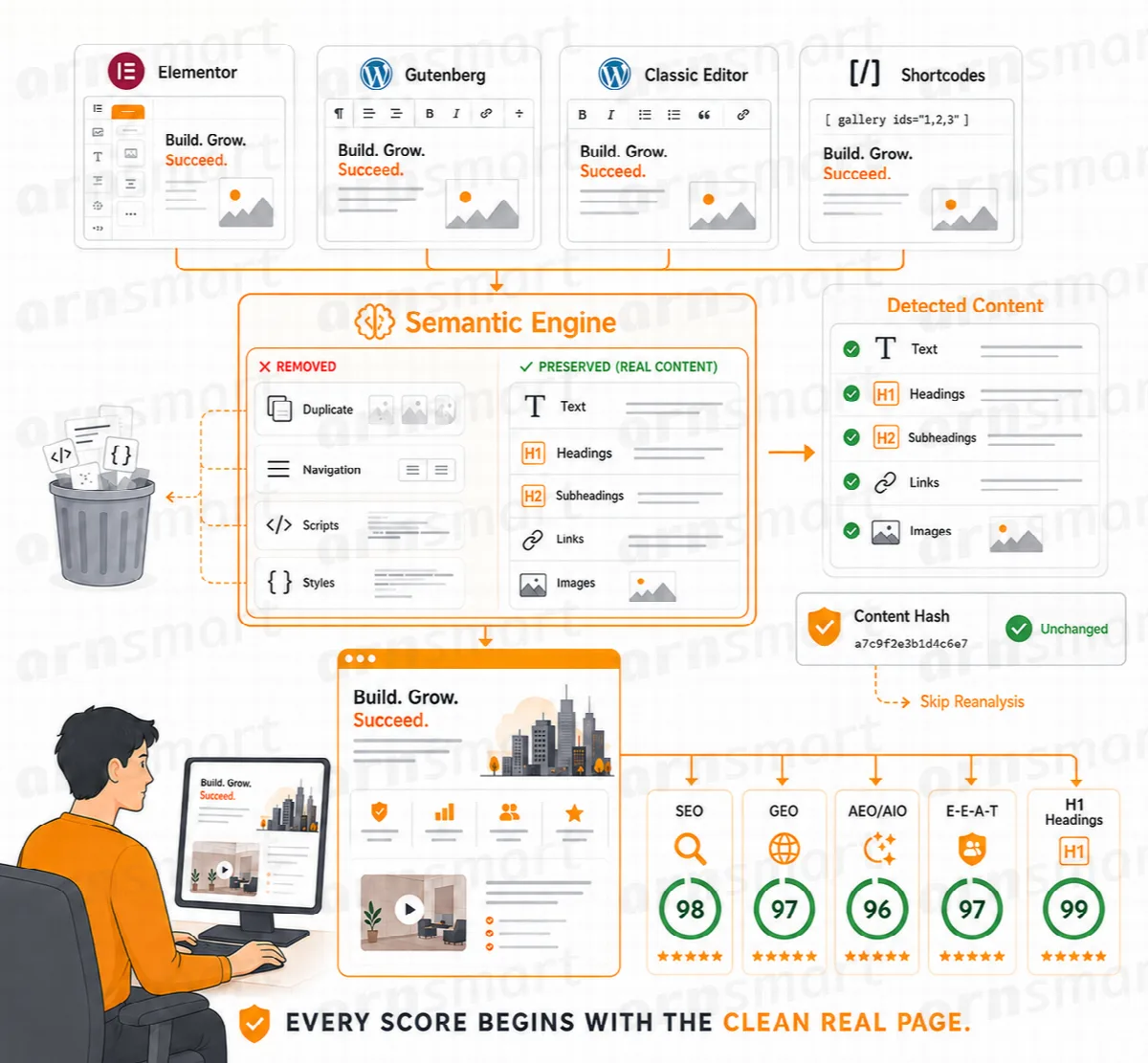
Vendix analyses the content visitors actually receive, rendered from Elementor, Gutenberg, the Classic Editor and shortcodes. It finds one visible content source so nothing is counted twice, removes navigation, scripts and styles, and checks:
- the H1 and the heading hierarchy (H1–H6),
- images and missing alt text, internal and external links, length and structure,
- the page language (from the site language, Polylang or WPML), with a warning when the text is mostly written in another script.
The What the system detected panel shows the content source the analysis used and its words, headings, images and links. A content hash avoids analysing an unchanged page again. Scores organize review signals; they do not promise rankings, traffic or AI citations.
Vendix Free includes metadata, robots, schema, the XML sitemap, the sharing preview and the readiness analysis, and from Vendix 3.0.0 the date of correction notes and the Rating Badge's rating schema. Redirects, the AEO and E-E-A-T fields, Search Intelligence, Content Freshness, the Site Report, news schema, live coverage and the Dynamic Content node are part of Vendix Pro; see Redirects, Search Intelligence, Content Freshness and the Site Report.