
With WooCommerce active, Vendix Templates can also design the store pages: product, shop, cart, checkout, order received, My account and order tracking. The store page widgets print WooCommerce's own gallery, forms, tabs and order blocks, so variations, payments and the parts other plugins add keep working.
Where to find it: Vendix Templates → Add New, in the Store group. The store types need WooCommerce and Elementor.
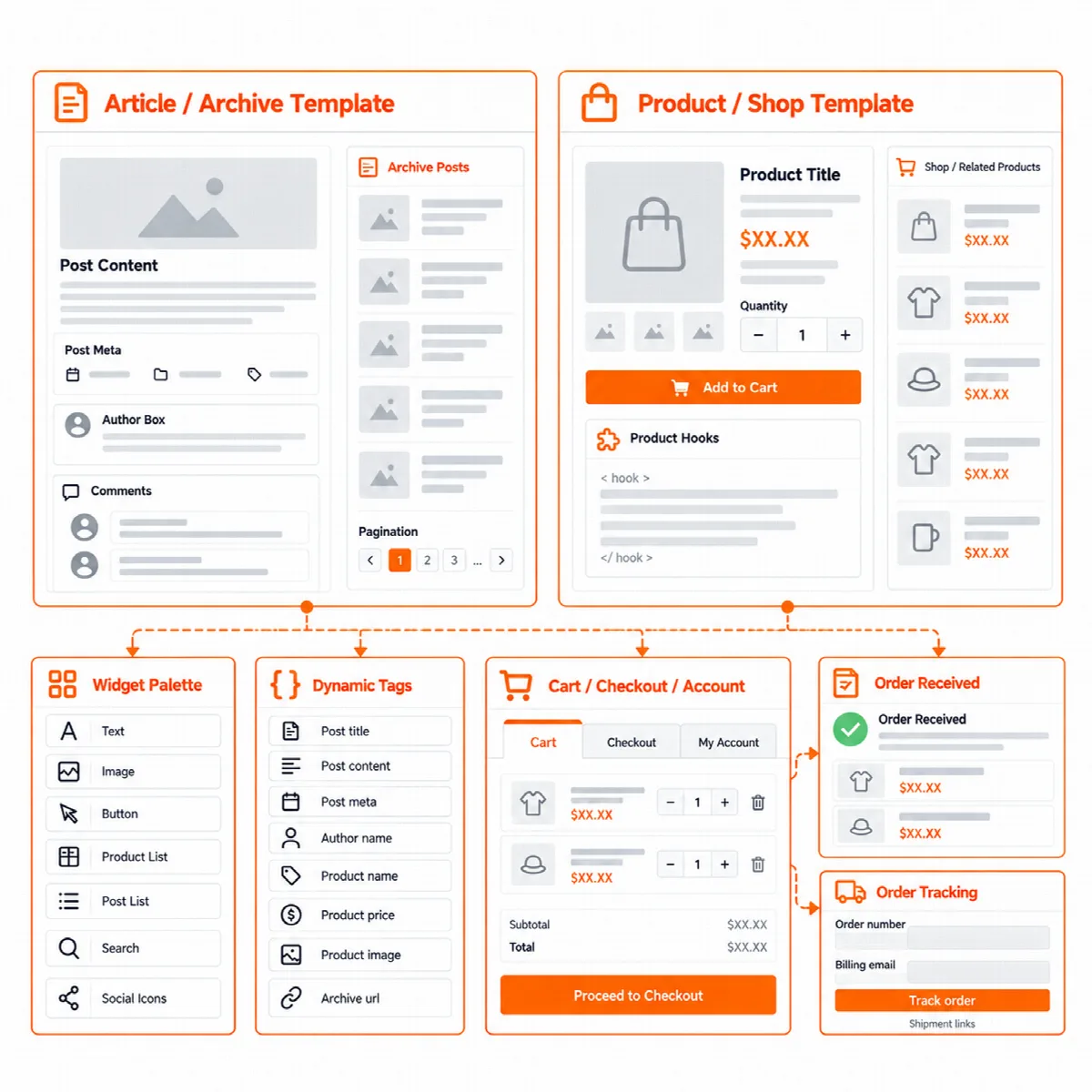
Create a store template
- Go to Vendix Templates → Add New and pick a store type.
- Start from Vendix classic, Vendix feature or a blank layout.
- Use Preview with to check the template with a chosen product or archive. An order received template can be previewed with a sample order; a user who may edit orders can also choose a real order by its number.
- Set the conditions and switch the template on in All Templates.
The editor tells you what the live page would lack, for example a product template without ARN Product Hooks or an order received template without ARN Order Items.
Store conditions
- Store: all products, product categories, tags and brands, single products, the shop page, attribute archives and product search results.
- Order received: order status, payment method and product category. These match only for a visitor whose order WooCommerce has verified; other visitors see the template set for all orders.
- Checkout and account: a Pay for order page condition for checkout templates, and account pages or logged-out visitors for My account templates.
Store page widgets
The Elementor panel lists these widgets only in the editor of a Vendix template of their type. The product and shop widgets are in ARN Smart Widgets; the cart, checkout, order received and account widgets have their own ARN Store Pages group.
| Page | Widgets |
|---|---|
| Product | Product Gallery, Add to Cart, Product Tabs, Product Meta, Store Notices, Product Hooks, Linked Products, Delivery Estimate |
| Shop and product lists | Products, Product Filter |
| Cart and checkout | Checkout Steps, Free Shipping Bar, Trust Badges |
| Order received | Order Status, Order Summary, Order Items, Order Addresses, Order Extras, Create Account |
| My account | Account Navigation |
- Product page. ARN Product Gallery, Add to Cart, Product Tabs, Product Meta, Store Notices and Product Hooks print WooCommerce's own gallery, form, tabs and meta line. Zoom, the lightbox and the parts other plugins add keep working. ARN Linked Products shows related products, upsells and cross-sells, and ARN Delivery Estimate shows the expected delivery window with a countdown.
- Shop. ARN Products uses WooCommerce's own product loop and card, with sorting, page numbers, "Load more" or infinite scroll. ARN Product Filter sits in a sidebar, a top bar or a drawer on phones.
- Cart, checkout and account. ARN Post Content prints the cart, checkout and account forms, and the widgets around it add the rest. ARN Account Navigation shows the account menu as a vertical list, tabs or tabs with icons, and as a scrolling row or a drop-down list on phones.
- Order received. The order widgets print WooCommerce's Order Confirmation blocks, so WooCommerce decides who may see an order. ARN Order Extras shows the bank details with Copy buttons and a payment reference. Where a template holds one of these widgets, the page does not print the same part a second time.
A product that asks for a password shows the theme's password form; the template appears after the password is given.
Order tracking template
The order tracking template is used on the page you choose as Order tracking page in the Shipment Tracking settings. See WooCommerce shipment tracking and email designs.
Product and store dynamic tags
- Vendix Product: price, sale badge, SKU, stock, rating, gallery, brand, add to cart link and more.
- Vendix Store: cart item count, free shipping remaining, order number and total, customer name and more.
- Vendix Archive: on the shop, product searches and product archives, the archive title and description follow WooCommerce.
Themes
Store templates run on other WordPress themes too, where they replace the content area. With Vendix Theme they print in the theme's single and archive places, and a shop template leaves out the theme's shop sidebar. Where Elementor Pro's Theme Builder fills the same place, Vendix steps back.