
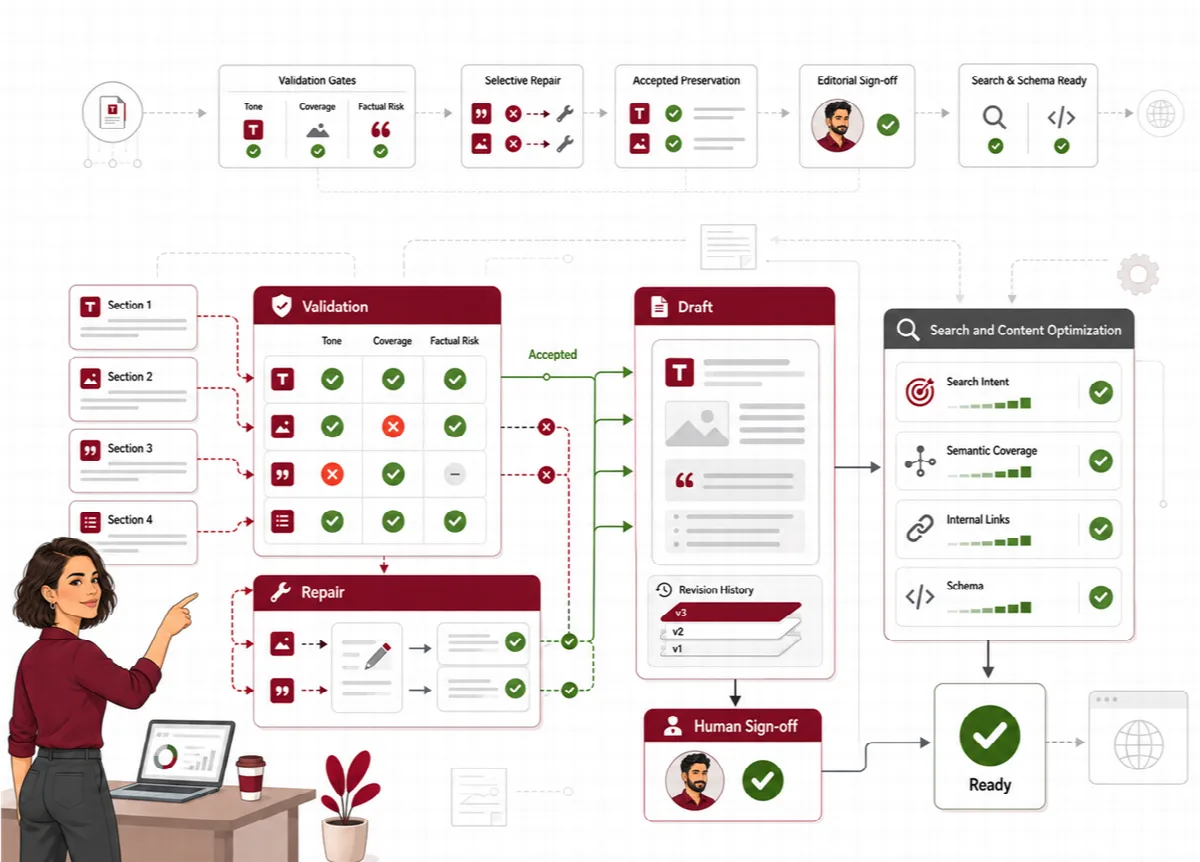
When the sections are validated, Contix Pro joins them into one article draft. In the Drafts screen you read and edit the whole article before analysis and publishing. Every saved edit becomes a new revision, and earlier revisions stay readable.
Where to find it: ARN Contix → Production → Drafts, or Open Validated Draft in the Production Monitor.
Open the draft
- Open Production → Drafts and choose the project and topic.
- Click Open Draft.
- If no article exists yet, click Assemble Article Draft to join the validated sections. After the pipeline changed, Reassemble Article rebuilds the draft from the current validated sections.
A generated draft is separate from a WordPress post. Completing production does not publish anything on your site.
Edit the article
- Read the full draft and compare it with the topic goal and the architecture.
- Check the factual claims, examples, sources, headings, tone and required sections.
- Edit the text in the Article Markdown editor. Keep the section headings that start with
##; their text can change, but the number of sections must stay the same. - Click Save as new revision.
The edit becomes a new revision, and the new revision is analysed again. Run the analysis on it before metadata, internal links and publishing. See Analyse and optimize the article.
When the editor is read-only, the screen tells you why:
- an earlier revision is open (retained revisions are read-only),
- the article must first be reassembled from its current validated sections,
- the article was imported from WordPress by Refresh; it can be edited here after its first optimized revision. To change the imported source, edit the WordPress post and import it again.
Compare revisions
Every saved article revision is kept.
- Expand Technical Details, then Revision History.
- Click View next to a revision.
Contix shows the current revision and the chosen revision side by side with their word counts and the word difference. Click Open comparison text to read the earlier text.
General retention cleanup never removes saved content revisions.
Read the draft-stage scores
The Draft-Stage Validation panel next to the editor shows:
- Draft Validation, with Ready for Full Analysis or Below Draft Quality Target, and how many sections are validated,
- SEO Draft Alignment, GEO Passage Readiness and AEO Answer Readiness.
These are draft-stage scores: each section is checked against its own contract, and every headline signal must reach at least 90%. A draft that meets them shows Validated 90+ Draft. The full-article analysis that follows uses a different, stricter scope, so its scores can differ.
Statistics and AI usage
- Content Statistics: words, paragraphs, sections and reading time.
- AI Usage: total tokens, requests and recorded cost of the topic, split into input and output tokens. Requests to a model without a price appear as Unpriced.
Technical Details also lists the assembly status, the integrity gate and blocking regressions, local recovery, mapped sections, the revision number and hashes, the normalization operations and the assembly delta ledger. These help support find the cause of an assembly problem.