
Refresh brings an existing post or page back up to date without losing the original. Contix Pro imports the post, audits it and proposes a bounded refresh decision. Nothing is rewritten or redirected until you approve it, and the original content and metadata are kept as the rollback source.
Where to find it: ARN Contix → Publishing → Refresh. Choose the project and topic and click Open refresh workspace.
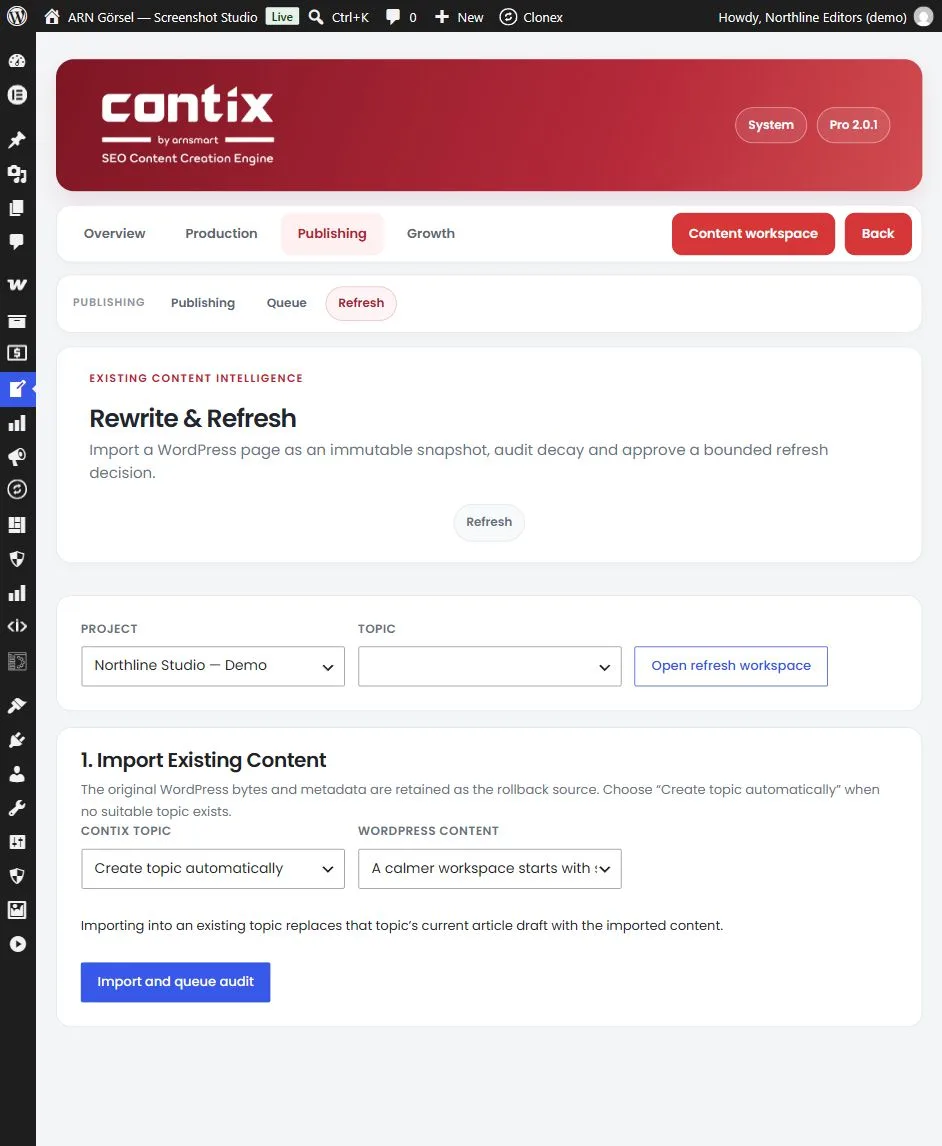
1. Import existing content
- Under 1. Import Existing Content, choose the Contix topic, or Create topic automatically.
- Under WordPress content, select the post or page.
- Click Import and queue audit.
Importing into an existing topic replaces that topic's article draft. The imported post, its revision, its decay signal and the decision are shown after the import.
2. Read the content audit
The 2. Content Audit checks:
- words and headings,
- age and stale years mentioned in the text,
- missing coverage,
- broken sources,
- search intent and the available performance signals.
Click Run audit again after you changed the post or imported new performance data.
3. Approve the refresh plan
The 3. Refresh Plan proposes one action and lists the tasks behind it, such as updating stale dates and statistics, replacing broken sources, closing coverage gaps or checking the search intent again.
| Action | When Contix proposes it |
|---|---|
| Refresh | The content shows clear signs of decay |
| Expand | The post is short (under 900 words) or misses more than one secondary topic |
| Merge | Search & Evidence Intelligence found several pages for the same need; merge the unique value into one target page, then redirect |
| Split | The post is very long (over 4,000 words and 14 headings) and covers separate intents |
| Remove Or Redirect | The post is very thin (under 150 words) and has no current clicks |
| Monitor | No material decay was found; record a new measurement later |
- Check or change the Approved action.
- For Merge or Remove Or Redirect, enter the Redirect target when required.
- Tick "I reviewed this plan and its canonical/redirect impact." and click Approve refresh plan.
- Click Continue through content and publishing to take the refreshed article through analysis and the publishing package. (A Monitor decision has no content step.)
If a redirect is already active for the topic, the plan shows it. Approving another decision or target replaces it, and rollback removes it.
How the 301 redirect is created
When you approve Merge or Remove Or Redirect, Contix creates a 301 redirect with the first redirect writer that is available on your site:
- ARN Vendix
- Redirection
- Rank Math (Redirections module)
- Yoast SEO Premium
Without one of them, Contix serves the redirect itself. Contix's own redirects can only point to an address on your site; for a target on another site, install ARN Vendix or another supported redirect plugin. If a redirect plugin refuses the rule, for example because it would create a loop or the rule already exists, Contix shows the reason.
ARN Vendix is recommended for redirects because it checks loops and keeps a full redirect list.
4. Record the outcome or roll back
Under 4. Outcome & Recovery:
- Save outcome measurement records the results after the refresh, so you can compare them later.
- Rollback WordPress content restores the imported snapshot of the post. Contix creates a WordPress revision first and removes the redirect created by the plan.
Find posts worth refreshing
The Performance screen marks declining pages and links to a refresh audit with Open refresh. See Track performance with Google Search Console.