
Contix Pro writes an article one section at a time instead of producing it from a single prompt. Each section has a contract that says what it must deliver, is checked against that contract and is repaired on its own if it fails. A weak passage stays local, and the rest of the article is not rewritten.
Where to find it: in Guided Workflow, Review Current Checkpoint opens these stages. They follow the Content Architecture in the same review screen.
Section Contracts
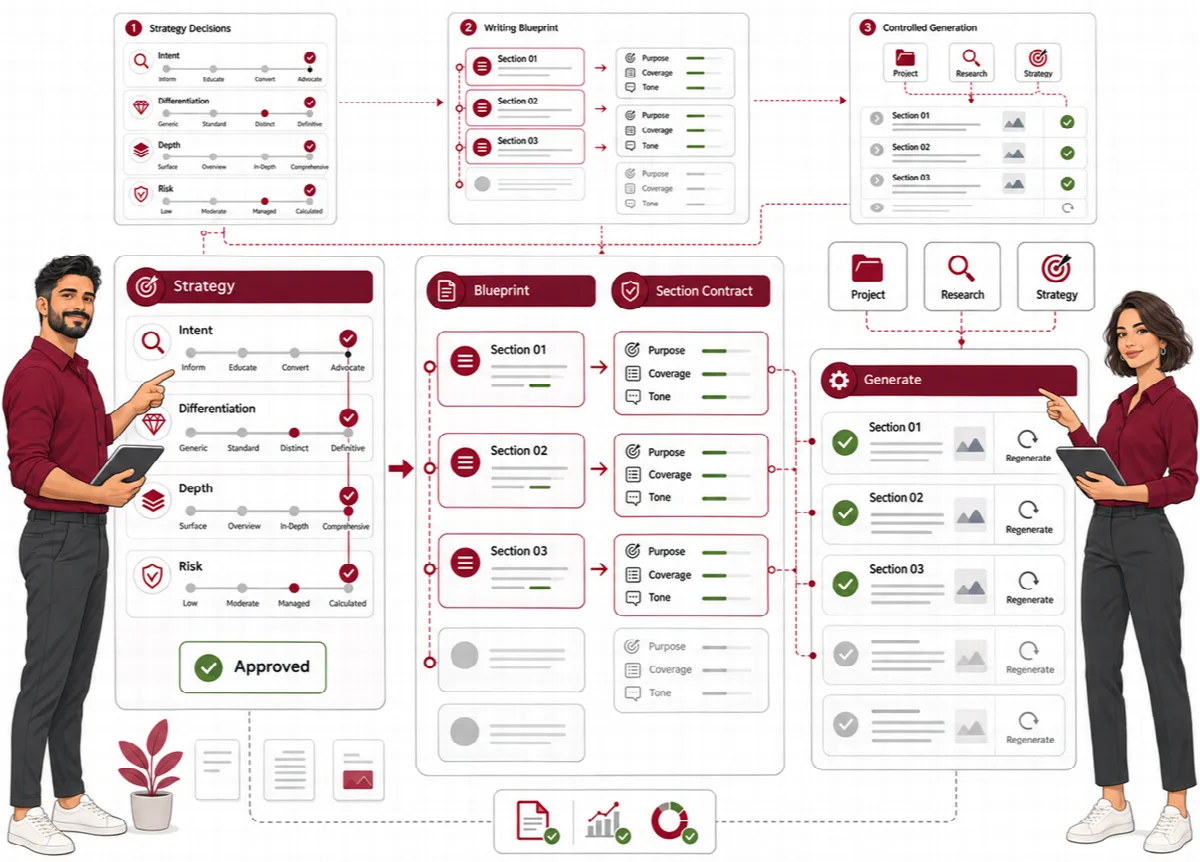
A Section Contract is built from the Writing Blueprint for every section. It is the standard the section is written and validated against.
- Reader intent and length: the reader intent of the section and its minimum, recommended and maximum word count.
- Required coverage: the questions, decisions, objections, comparisons and entities the section must include.
- Repair instructions: what to fix if the section fails, together with your notes.
| Contract element | Set from | Checked by |
|---|---|---|
| Reader intent | Section map and Strategy Contract | Section validation |
| Required coverage | Writing Blueprint and entity plan | Coverage checks |
| Target words | Writing Blueprint length | Section validation |
Use Regenerate This Contract for one section or Regenerate Section Contracts for all of them.
Prompt Packages
A Prompt Package turns one Section Contract into the exact instructions sent to the AI: the System Instruction, the Task Instruction, the provider profile and Max Output Tokens. Every package is checked before writing starts.
- Preview Prompt Package shows what will be sent.
- To use your own wording, edit the instructions and click Save Prompt Override.
- Regenerate This Prompt rebuilds one package; Rebuild Prompt Packages rebuilds all of them.
Section Generation
Section Generation writes every section against its contract and Prompt Package. For each section you see its words, latency and tokens, and its status: generated, failed, needs validation, pending or blocked.
| Button | What it does |
|---|---|
| Generate Pending Sections | Writes the sections that have not been written yet |
| Generate This Section | Writes one pending section |
| Regenerate Section | Rewrites one section against the same contract; the other sections stay as they are |
| Retry Failed Sections | Retries only the sections that failed, without touching successful drafts |
| Regenerate All Sections | Starts the section stage again, for example after the architecture changed |
| Pause Queue | Pauses the generation jobs |
A section blocked by its prompt check shows the reason and a link to Review Prompt Package. A regenerated section goes through validation again before it counts as current.
Section Validation
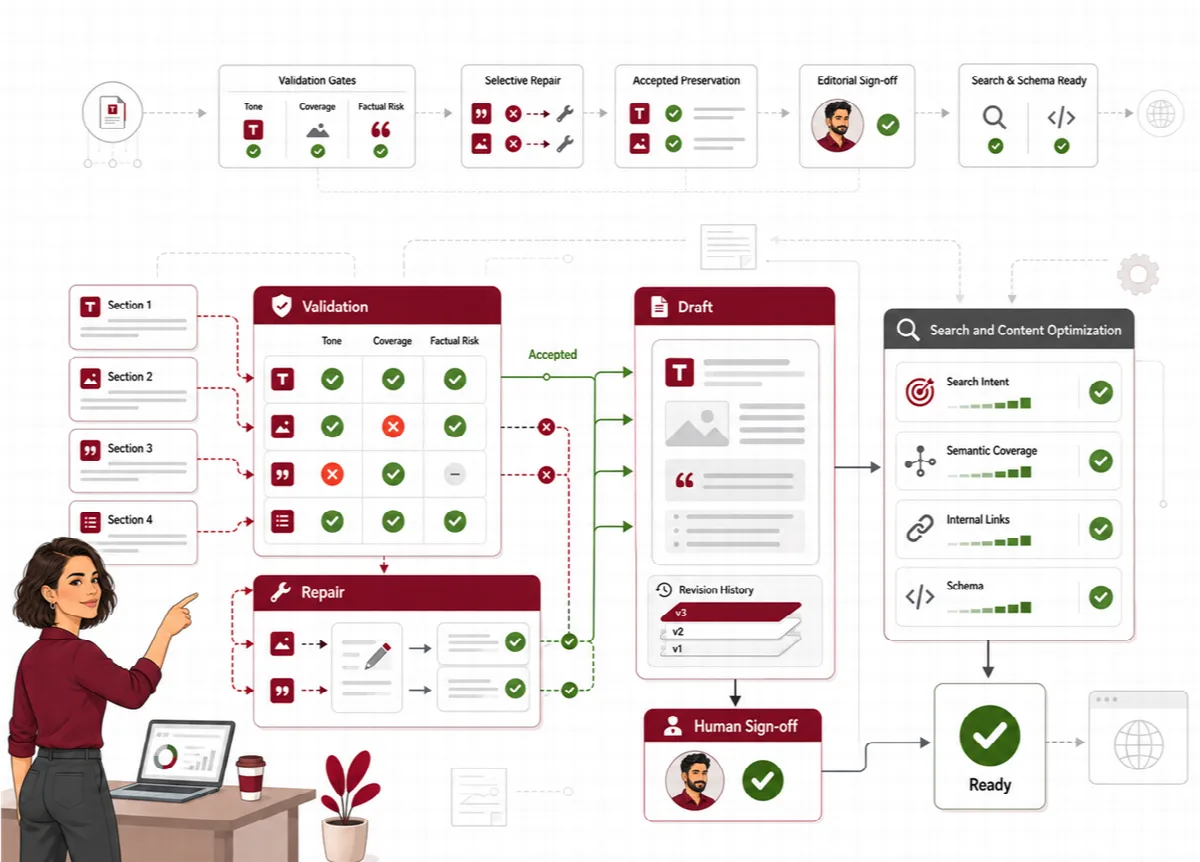
Contix validates each section against its Section Contract before it is accepted. Validation reports coverage gaps, SEO and GEO findings, invalid entities and major or critical findings. Each section is marked Validated or Needs Repair, with a quality score, its findings and its repair instructions.
The validation screen also shows:
- Quality Analytics: average, highest, lowest and median quality and the recorded tokens of the run,
- Repair Reason Analytics: why sections needed repair,
- Token Efficiency: tokens of the first generation compared with the selective repairs.
Use Validate Pending Sections, Revalidate Repair Candidates or Validate Again for one section.
Local Repair
The Local Repair stage of the run fixes only the sections that failed validation, with their recorded repair instructions. Sections that passed are not rewritten. A repaired section goes back through validation before it is accepted.
- For a section marked Needs Repair, Rebuild This Section rebuilds only that section from its Writing Blueprint: its Section Contract, Prompt Package, draft and validation are replaced. Passed sections stay untouched.
- The repair figures show the sections repaired, the successful repairs, the average improvement and the average attempts.
Coverage Intelligence
Before writing starts, Coverage Intelligence checks whether the planned article answers the required questions, decisions, objections, comparisons, examples and entities. Each kind of coverage gets a score, and the target is 90% by default.
Coverage Repair feeds the gaps back into the structure: it adds FAQ, objection, comparison, decision and example sections as needed, and shows the coverage before and after repair. It does not run new research.
Draft Assembly
Draft Assembly joins the validated sections into one article draft and checks that nothing was lost on the way. The draft then opens in Production → Drafts. See Edit the draft and compare revisions.
Validation reports findings; the decision to repair, regenerate or accept stays with the editor.