
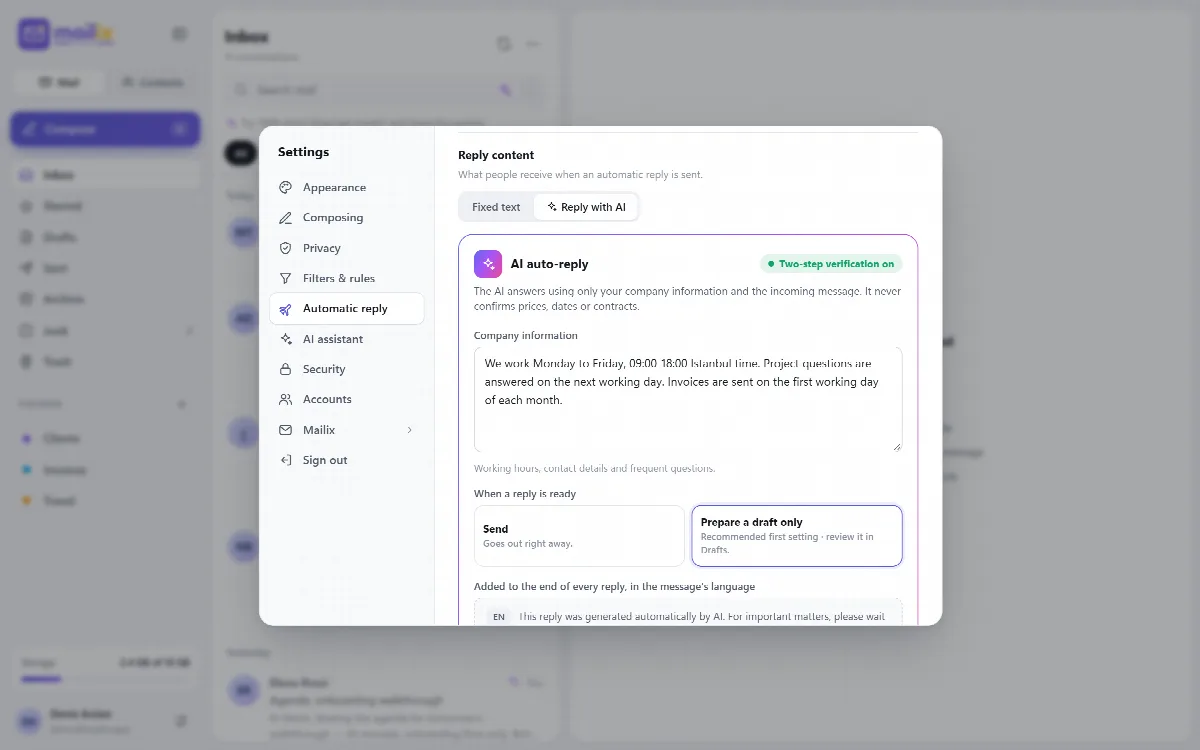
With Reply with AI, the company's AI account writes each automatic reply from the incoming message and the company information you enter, such as working hours, contact details and frequent questions.
Before you start
- Company AI account: your company must have connected one. See Connect the company AI account.
- cPanel Webmail: AI replies run on the server-wide installation only.
- Two-step verification must be on for the mailbox. Without it, the choice is locked and shows Turn on two-step verification in Security to use AI auto-reply. with an Open Security button.
- The server administrator must allow the Suggested replies feature.
Turn on AI replies
- Open Settings → Automatic reply and choose a Date range or Weekly schedule. See Set up an automatic reply.
- Under Fixed text, fill in the subject and message first. They are still required, and their fields are hidden once Reply with AI is chosen.
- Under the reply content, choose Reply with AI.
- Write the Company information: working hours, contact details and frequent questions, up to 4000 characters. The AI uses only this and the incoming message.
- Under When a reply is ready, choose Prepare a draft only first. The reply then goes to your Drafts folder, and you review and send it.
- Save. When you trust the replies, you can switch to Send, which sends them right away.
The rules the AI follows
- It uses only facts from the company information.
- It never confirms prices, discounts, dates, appointments, orders, contracts or other commitments.
- It writes a short, polite plain-text reply of at most 120 words, without a signature, in the sender's language.
- It adds no links, domains, email addresses or phone numbers that are not in the company information.
A reply that is too long, or that contains a link or domain missing from the company information, is not used.
The AI notice
Every AI reply ends with a note in the message's language (English, Turkish or Arabic; English for other languages) saying that it was written by AI. The notices are shown on the settings screen.
When the fixed text is sent instead
Mailix sends the fixed text when the AI cannot answer, for example when:
- two-step verification was turned off later;
- the company has no AI account any more;
- the monthly AI limit of the mailbox is reached;
- the provider returns an error, or the reply cannot be used.
Every AI reply counts toward the mailbox's monthly AI requests.
Check the first replies
- Recently sent replies lists the last five replies; replies prepared only as drafts carry the Draft tag.
- Open Drafts to review and send the replies the AI prepared.
The same protections as for every automatic reply apply: no replies to bulk mail, lists, automatic messages, spam or forged senders, and at most 50 different people a day.