
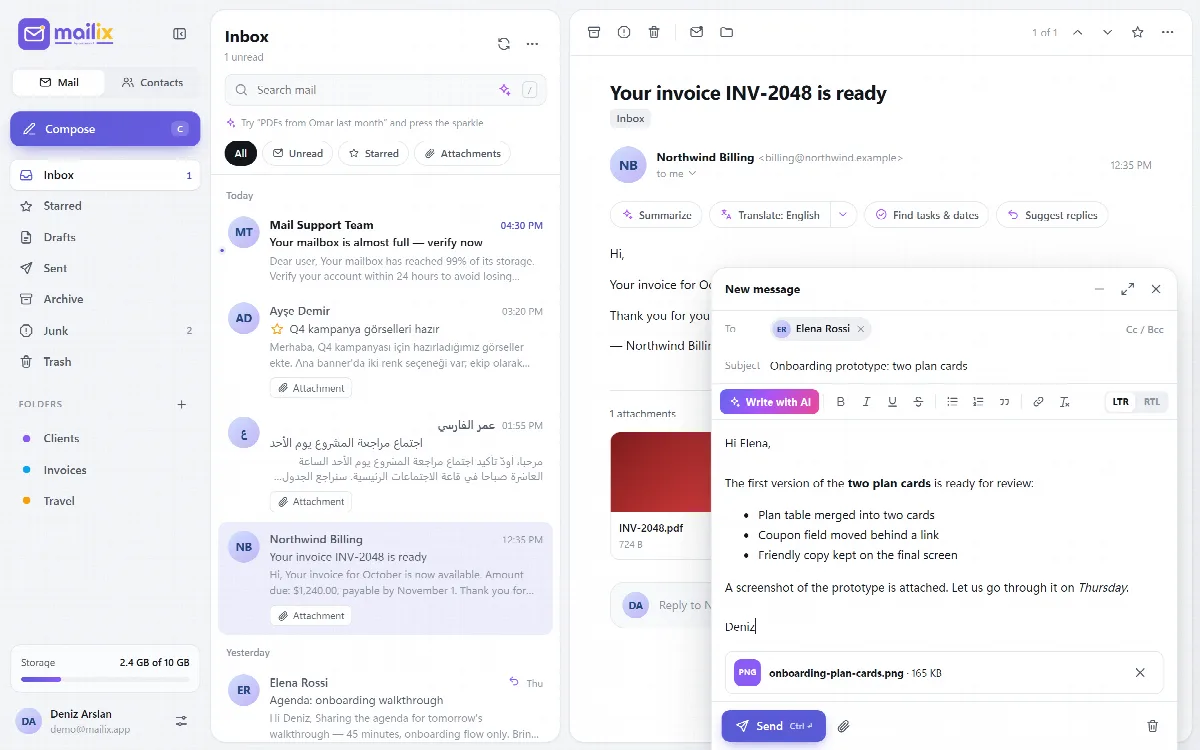
Compose (shortcut C), Reply (R), Reply all (A), Forward (F) and continuing a draft all open the same compose window. You can minimize the window or make it full screen. Ctrl+Enter (Cmd+Enter on a Mac) sends.
Add recipients
- Type an address in To. Addresses become chips when you type a comma, semicolon, Enter or Tab, or when you leave the field. A pasted list of addresses is split by itself.
- Suggestions appear while you type: your address book first, then people you have written to. Use the arrow keys and Enter to pick one.
- Cc / Bcc opens the Cc and Bcc fields.
- Invalid addresses are shown in red. Each field takes up to 200 addresses.
Format the text
The toolbar offers bold, italic, underline, strikethrough, bulleted and numbered lists, quote, Insert link and Clear formatting.
- Writing direction. The LTR and RTL buttons change the direction of the writing area. With the Arabic interface, the window opens in RTL.
- Pasted text is cleaned to basic formatting, so it cannot bring scripts or hidden styles.
- Spell checking is your browser's own.
Attach files
Drag files onto the window, or click Attach files. Each attachment shows its upload progress and can be removed. By default, one message can carry up to 25 MB of attachments; your server administrator sets this limit. Mailix waits until all uploads finish before it sends.
When you forward a message, its attachments come along. They are copied on the server, without downloading them to your browser first.
Set your name and signature
In Settings → Composing:
- Your name is the name recipients see.
- Signature is a formatted signature added to new messages and replies.
Drafts
While you write, Mailix saves the message to Drafts every 15 seconds, and again when you close the window. The footer shows Saving…, Draft saved or Draft not saved. Open a message in Drafts to continue it. Discard (the trash icon) closes the window after asking; a saved draft moves to Trash.
Undo send
Choose Undo send in Settings → Composing: Off, 5 seconds (the default), 10 or 20 seconds. During that time the sending notice has an Undo button that brings the message back exactly as it was. After that, the message has left the server.
If sending fails, Mailix shows the error and reopens the window, so nothing you wrote is lost. A sent message is saved to Sent.
Replies and forwards
- A reply goes to the message's Reply-To address if it has one, otherwise to the sender. Reply all adds the other recipients and leaves out your own address.
- Replies quote the original under "On {date}, {name} wrote:", and forwards add a "Forwarded message" heading.
- Quotes keep the original text formatting.
With the AI assistant on, the compose window also has Write with AI. See Use the AI assistant.
Send later and encryption
The clock button next to Send schedules the message for later; see Send a message later. The Sign and Encrypt switches in the footer sign and encrypt it with OpenPGP; see Encrypt and sign messages with OpenPGP.