
Mailix keeps contacts in the server's CardDAV address book. CardDAV is the standard that phones and mail programs use to sync contacts, so a contact saved in Mailix appears on every device that uses the same address book, and the other way round.
Where to find it: the Contacts tab at the top of the sidebar, or G then C.
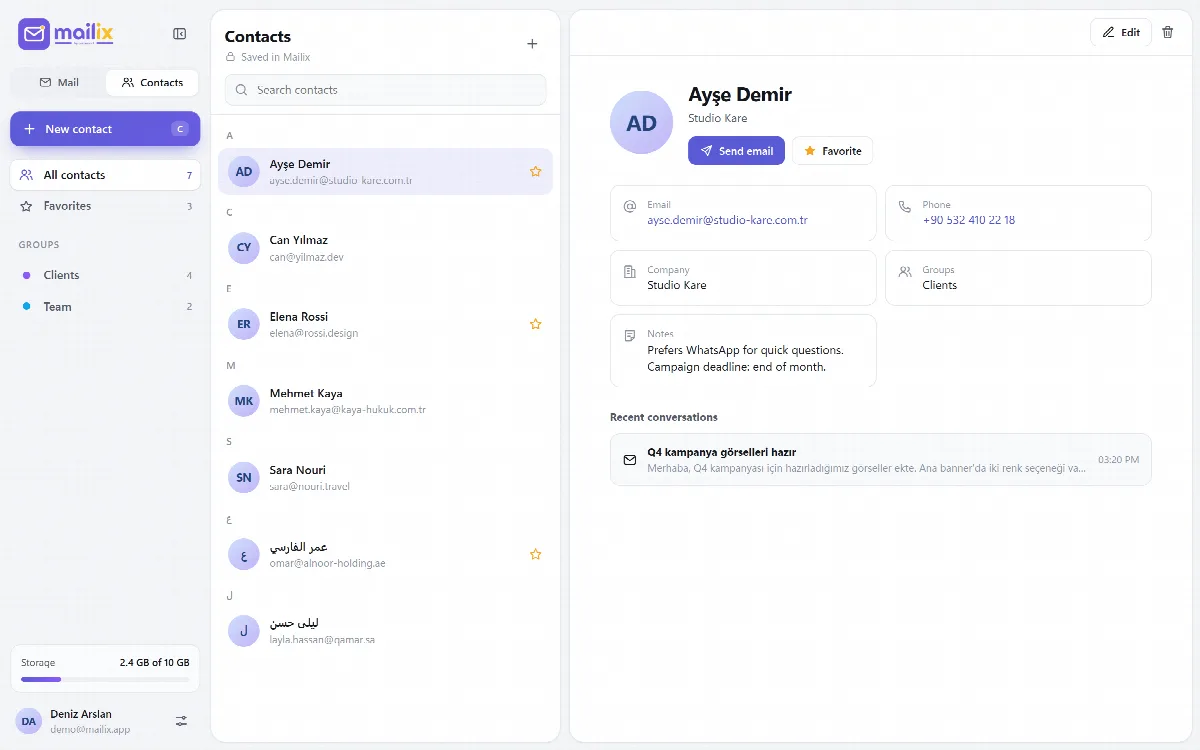
Where contacts are stored
The heading of the contact list tells you:
- Synced with your server · CardDAV: contacts are in the server's address book. cPanel provides one for every mailbox.
- Saved in Mailix: the server has no CardDAV address book, or CardDAV is turned off, so contacts are kept in Mailix's own storage.
Find a contact
- The list is sorted by name and grouped by first letter. Favorites have a star.
- Search contacts searches names, companies, email addresses and phone numbers.
- The sidebar shows All contacts, Favorites and every group, each with its count.
The contact card
A contact card shows the name, company, every email address and phone number, groups, notes and Recent conversations with that person in your Inbox.
- Click an email address, or Send email, to write a new message.
- Click a phone number to call it.
- Add to favorites stars the contact. Favorites are stored in the card itself, so other programs see them too.
Add or edit a contact
- Click New contact (on phones, the round button at the bottom right), or open a contact and edit it.
- Fill in the name, one or more email addresses and phone numbers (Add another), the company, groups and notes. Separate groups with commas.
- Click Save. A contact needs at least a name or an email address.
Information Mailix does not edit, such as photos, postal addresses and birthdays, stays in the card. A photo added on your phone is not lost when you save the contact in Mailix.
Recipient suggestions
When you type a recipient, matching contacts from your address book come first, then addresses you have written to. Mailix collects those addresses from the senders of messages you open and the recipients of messages you send.
What Mailix does not do
Mailix does not import or export vCard files. Use another program that works with the same CardDAV address book for that.